I’ve tested over 20 delivery management software to see which ones actually work. I’ve narrowed it down to the top 7; each one is the clear winner for a specific type of business. I will review the key features, design, driver app, pros, cons, reviews, trials or demos, and pricing for each one.
My Evaluation Criteria
During my testing, I judged every tool against these five core criteria:
- Supported Delivery Workflows: (Hub scanning, on-demand vs. scheduled)
- Financial Tools: (Driver wallets, COD management, and invoicing)
- Customer/Merchant Portals: (White-labeling and self-service booking)
- Dispatch Intelligence: (Predictive ETAs and route optimization)
- Platform Design: (A clean, single-screen dashboard for dispatchers)
Why You Can Trust This Review
Most “best of” lists are written by AI or researchers who never logged into the apps. To write this, I:
- Tested 20+ Platforms: Personally obtained demo access to the latest 2026 versions.
- Focused on “Information Gain”: I won’t waste your time listing “GPS tracking” for every tool. In 2026, every provider has it. Instead, I highlight the unique differentiators that make a tool win for its specific category.
7 Best Delivery Management Software: TL;DR
| Solution | Best For | Starting Price | Review Rating |
|---|---|---|---|
| Onro | Courier Companies | $239 / Month | Capterra: 5/5 G2: 5/5 |
| Onfleet | In-house Fleet and Own Deliveries | $599 / Month | Capterra: 4.6/5 G2: 4.6/5 |
| Track-POD | Route Planning | $49 / Driver | Capterra: 4.6/5 G2: 4.5/5 |
| Shipday | Restaurants with Food Delivery | Free | Capterra: 4.7/5 G2 no review |
| Spoke | Last-mile Distribution | $125 / Month | Capterra: 4.8/5 G2: 5/5 |
| DeTrack | Field Service Providers | $29 / Driver | Capterra: 4.6/5 G2: 4.5/5 |
| OptimoRoute | Scheduled Fixed Routes | $39 / Driver | Capterra: 4.6/5 G2: 4.8/5 |
Let’s now explore these tools in detail.
Onro: Best For Courier Companies
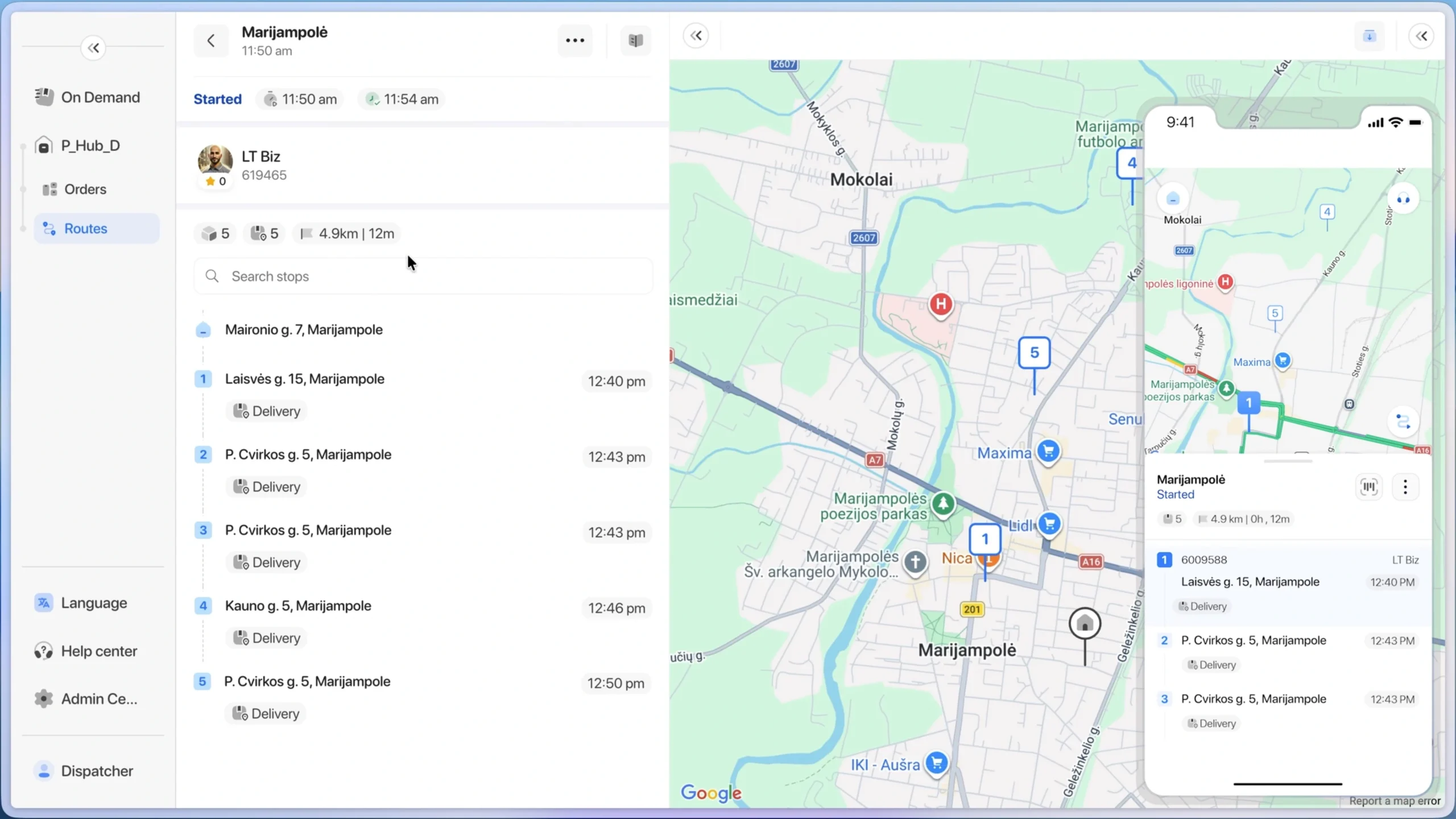
Onro provides delivery management software for courier companies, whether they offer same-day, next-day, or on-demand delivery services. It includes components that a courier company needs to manage, optimize, and automate operations.
Why Onro is the best for couriers?
- Specialized System Design: It’s not a general-purpose system; it is designed specifically for courier companies.
- Integrated Accounting Module: Provides features necessary for courier operations like driver withdrawals, cash on delivery, wallet transactions, and online payments.
- Customer-Centric Profiles: Each customer has a profile with their own login info, invoices, and address book.
- Dedicated Scanner App: A separate mobile component for people who work in the hub and need scanning functions.
- Communication Flexibility: Dynamically send notifications across different channels (SMS, WhatsApp, Email) to customers, receivers, and drivers.
- Verified Industry Success: Customer base consists mainly of courier companies with 5/5 ratings based on reviews.
Key Features
- White-labeled Customer Portal: Used under the customer domain.
- Versatile Delivery Pricing: Zone-based, distance, and more.
- Dedicated Tracking Page: Customers can enter their order number and track in real-time.
- Specialized Scanner App: For hub or warehouse operators to perform inbound scans, sorting, and parcel management.
- Flexible Dispatching Algorithm: Dynamic for both busy and quiet times.
| Pros | Cons |
|---|---|
| Supporting different workflows within a courier company | No advanced route planning features, such as capacity, break times, and multiple vehicles |
| Single order for the entire delivery process using one label | Lack of ability to define recurring routes |
| A multi-merchant Shopify app that can be used by a courier’s merchant customers | Multi-piece orders cannot be handled efficiently. Onro recommends using one parcel per order, which is great for e-commerce but not for multi-part large items. |
| Supporting pickup, hub, and delivery statuses such as at the warehouse, out for delivery, and returned | Mastering the product to be used in an enterprise corporation takes time |
Onro Pricing & Trial Info
Onro provides a 14-day trial for the complete version of the platform. There are two pricing packages:
- Business: $239 / Month (1,500 deliveries included)
- Enterprise: Custom (White-label components are provided with this package)
Driver App
The driver app supports both internal and contractor or freelancer models. The app is simple to use and includes an in-app wallet, chat, routes, and more features. Drivers have control over their accounts, such as changing passwords, and can view statistics like earnings and cash on delivery collected.
Design
Separating different courier workflows (direct and route-based) is a smart move for the dispatcher. A modern design for real-time monitoring and actions. Having drivers, orders, stats, and delays on one screen gives the operations team strong control.
Support
There is a real-time chat box within the product to get support from the team. Within different product pages, related knowledge base articles are available to learn more, which is handy when needed.
Onro Rating & Reviews
Onro is listed as top courier software in 2026 by G2.
What people say about Onro?
A flexible and feature-rich courier management platform that keeps improving
Onro has allowed me to manage my courier operations with much more clarity and control. I appreciate how feature-rich the platform is, especially the real-time tracking, status updates, and the ability to customise workflows. (Verified review link on G2)
Reliable Technology Partner for On-Demand Delivery
Our overall experience with Onro has been very positive. The platform has been reliable and well-suited for our on-demand delivery operations at GoGetit. It has helped streamline dispatching, rider management, and real-time tracking, reducing manual work and improving efficiency. The support team is responsive and understands last-mile delivery challenges, making Onro a dependable long-term technology partner for us. (Verified review link on Capterra)
Onfleet: Best For In-House Drivers and Own Deliveries
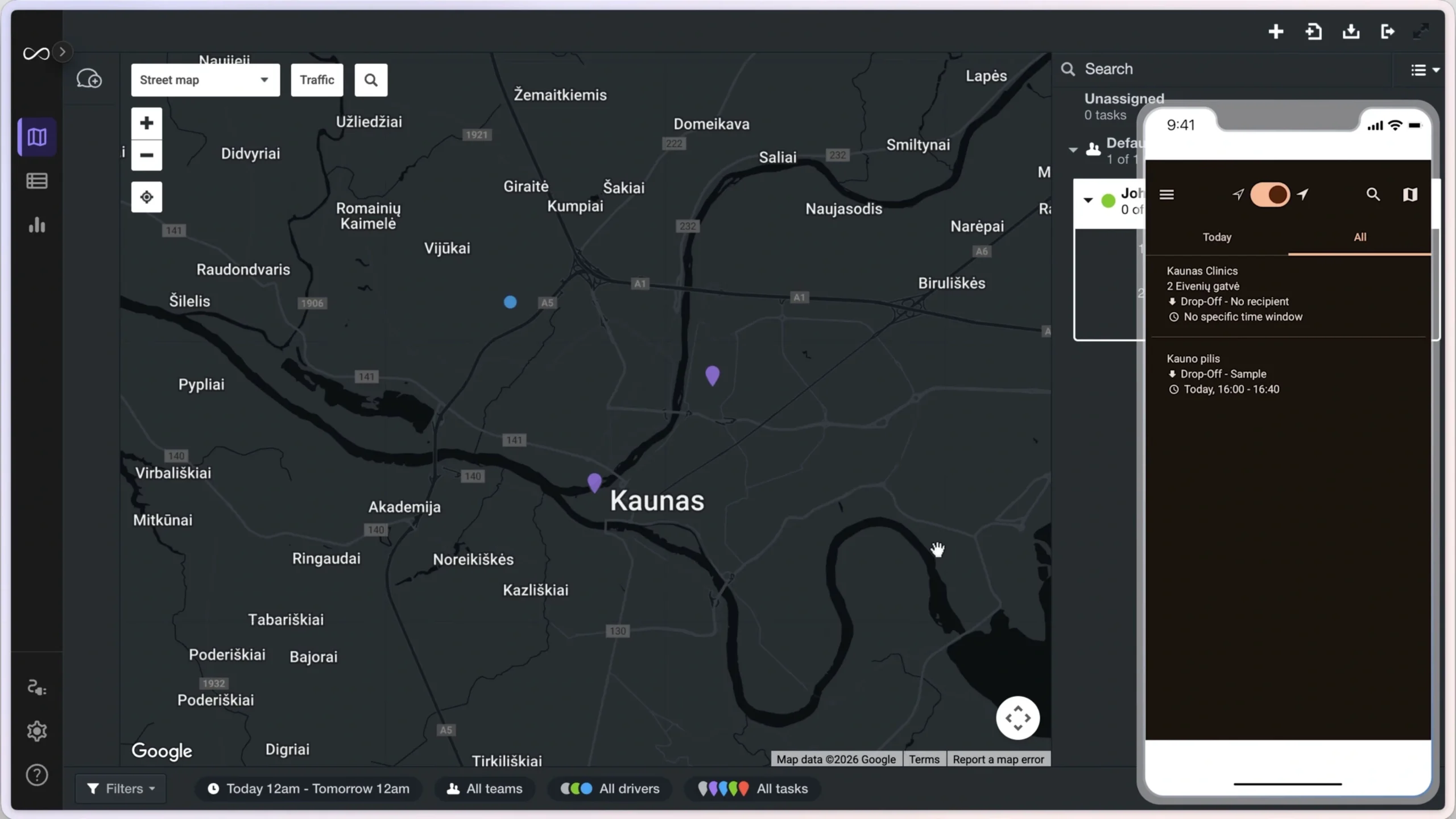
It is widely known as the backbone of cannabis delivery in the US. This web-based product focuses heavily on accuracy, which is reflected in its customer reviews. Because they possess a vast amount of historical data from major US cities, they can utilize machine learning to provide superior predictive ETAs. While the service is somewhat costly for certain regions, starting at $599 monthly, it is a robust solution. Onfleet does not focus heavily on driver profiles; they provide only the basic information necessary for companies working with internal drivers.
Why Onfleet is the best for in-house drivers?
- Organizational Mapping: The teams and hub concepts make it easy to map your specific company structure into the software.
- Direct Assignment: To assign orders to internal drivers, you do not need a complex dispatching algorithm because you already know which driver handles each area.
- Internal Fleet Focus: There are no built-in payout features for drivers, as it is tailored for salaried or internal staff.
- No Branding Distractions: There is no external branding for placing orders, keeping the focus on internal operations.
- Simplified Contact Management: There is no comprehensive customer concept; the system focuses purely on drop off or pickup contacts.
- Ease of Use: The platform is straightforward and offers great flexibility with integrations and additional metadata.
Key Features
- Proactive Communication: Automate customer contact based on ETAs, such as sending a tracking link when a driver is 5 minutes away.
- Delay Mechanism: Alerts and monitoring based on specific time windows to keep deliveries on track.
- Age Verification: A necessary requirement for alcohol and cannabis deliveries is built directly into the workflow.
- Versatile Map Modes: Includes various views like street, transit, and POIs, which are extremely useful for dispatchers.
| Pros | Cons |
|---|---|
| Reliable and highly accurate predictive ETAs | Heavy web-based system that requires a separate browser (Onfleet requirements) |
| Quick route optimization, where moving stops to a driver optimizes them instantly | No automated real-time dispatch algorithm; it relies on manual or force assignment |
| High integration flexibility with n8n and Zapier to connect with many software | No white-labeling options available for the customer and driver experience |
| Drivers can select from multiple companies before logging in |
Onfleet Pricing & Trial Info
Onfleet provides a 14-day demo with no credit card or email verification required, making it easy to test the product fast. Note that the demo does not include all features, such as those related to courier operations. Onfleet pricing packages:
- Launch: $599 / month (includes 2,500 stops)
- Scale: $1,299 / month (includes 5,000 stops)
- Enterprise: $2,999 / month (includes 10,000 stops)
Note: Having only one month of historical data for the $599 per month plan is too short.
Driver App
Drivers generally like the app due to its simple and intuitive design. A major benefit is the ability for drivers working with multiple companies to choose the correct organization before logging in. However, the app does not show full route details, only standalone tasks, and it lacks the ability for drivers to perform bulk actions.
Design
The product is web-based, featuring two dispatcher modes: map and table. The table is mainly used for bulk actions. Both follow a minimal design that requires some study; for example, there are small differences in the pins to differentiate them. In general, you can see and do a lot on a single page. Drag-and-drop functions are handy for manual assignment.
Support
Support is handled by filling out and submitting a long request form. Because delivery operations require quick responses to live issues, the lack of an instant chat can be challenging when things are happening quickly on the ground.
Onfleet Rating & Reviews
Shipday: Best For Restaurants
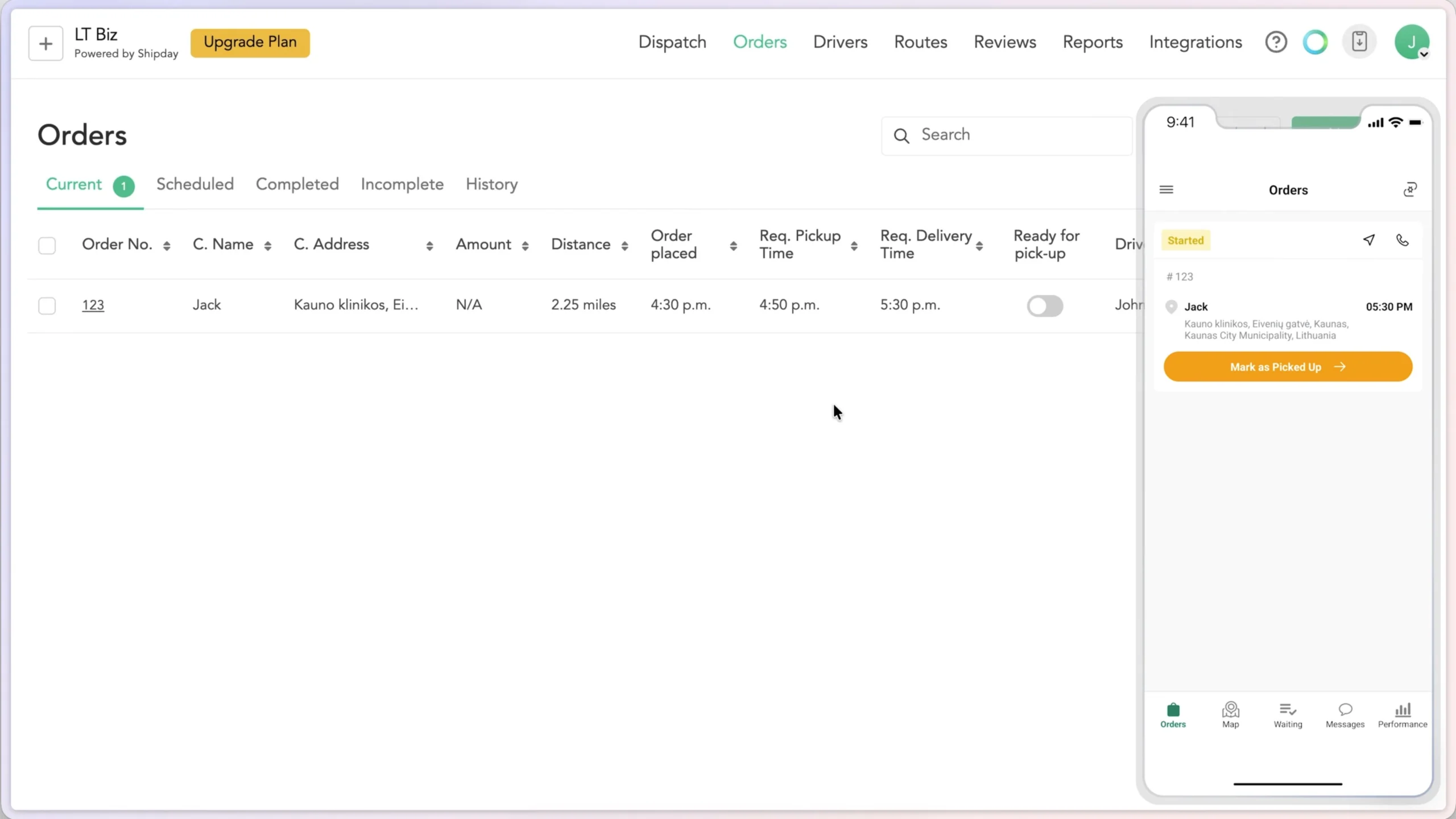
It is the top choice for restaurants looking to deliver to customers using their own drivers. The platform is simple to use and supports a pickup-then-drop flow specifically designed for restaurant delivery. The product is integrated with major restaurant management solution providers like GloriaFood, Toast, and Clover.
Why Shipday is the best for restaurants?
- Low Cost Pricing: It provides affordable pricing packages, including a free package for businesses with up to 10 daily orders.
- Third-Party Integration: It connects to Uber and DoorDash drivers, ensuring you always find a driver for food delivery even when your internal staff is busy.
- Simple Workflow: The workflow follows a straightforward pickup-to-delivery process for both drivers and dispatchers.
- Automation Tools: By utilizing numerous integrations, it serves as an effective automation tool for managing deliveries.
Key Features
- External Driver Access: Connected to DoorDash and Uber drivers so you can fulfill orders when internal drivers are unavailable.
- Route Optimization: The driver app includes built-in route optimization.
- Automated Free Version: A functional free version is available for smaller operations
| Pros | Cons |
|---|---|
| Free version available | Delivery prices and financial details cannot be hidden from drivers |
| Quick and easy assignment | Order numbers are not auto-generated and must be entered manually for each order |
| Drivers have accept and reject capabilities | Driver app navigation is limited to Google Maps and does not support Waze |
| Includes earning options for drivers |
Shipday Pricing & Trial Info
A free version is available and is sufficient to test whether the software fits your needs. There are no trials for the paid versions. Shipday pricing packages:
- Starter: Free (up to 300 orders/month)
- Professional: $39 / month (up to 300 orders)
- Elite: $119 / month (up to 300 orders)
Driver App
In the driver app, you don’t see separate tasks (pickup and delivery), which is good. One small issue is that when you open order details, you can’t perform actions; you have to go back, which creates an additional step for drivers. Collecting a POD is an option that drivers can disable. This can be problematic if you want to ensure that a POD is always received.
Design
The product is designed for users who prefer not to be overwhelmed by features. It separates functions into different pages, such as separate tabs for dispatch, maps, and order lists. While this organization can be an advantage, it may also be frustrating for users who need to switch between tabs frequently.
Support
Support is provided via an online chat within the product. AI support is also available and performed acceptably during testing with moderately complex questions.
Shipday Rating & Reviews
Spoke: Best For Last-mile Distribution
Previously known as Circuit, Spoke is a well-established brand recognized by drivers as a leading route optimization application. Beyond their popular driver app, they provide a robust B2B delivery management software. The product has been shaped over time by driver feedback, giving it some of the most advanced features for on-route stop management in the industry.
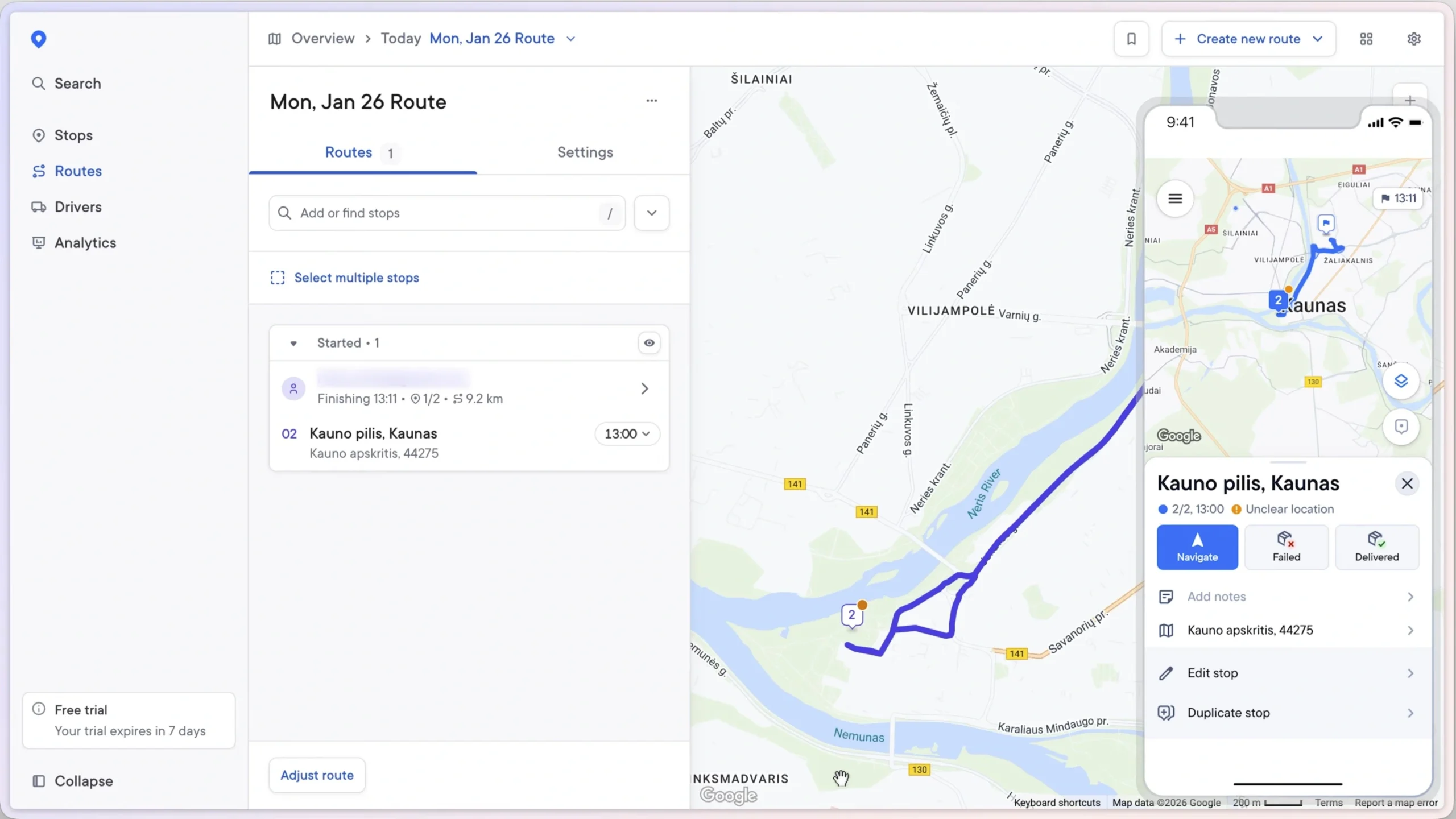
Why Spoke is the best for distribution last-mile?
- Depot-Centric Structure: The software is designed to define depots, assign drivers to them, and create daily routes per depot, which is the ideal model for distribution.
- Cost-Reducing Optimization: The high-quality route optimization serves as a primary driver for cost reduction in distribution-heavy operations.
- Internal Operations Focus: Since distribution is often handled via ERP or internal tools, the lack of extensive external branding options is not a drawback for this use case.
Key Features
- Vehicle Parcel Positioning: Helps drivers organize their load by recording exactly where each package is placed within the vehicle.
- Multi-Depot Management: Features a depot and calendar-based system specifically built for last-mile distribution centers.
- Visual Stop Entry: Allows drivers and dispatchers to import stops quickly by simply uploading a photo of an address.
| Pros | Cons |
|---|---|
| Top-tier optimization algorithm for high efficiency | Limited customization for order flows that do not follow the depot-route-stop structure |
| Drivers can modify routes on the fly based on personal preference | Lack of direct e-commerce integrations such as a WooCommerce app |
| Accurate address correction for stops | Multi-step assignment process that requires planning stops and creating routes before driver assignment |
Spoke Pricing & Trial Info
A 7-day free trial is available, though credit card details are required to begin the evaluation. The trial provides access to all features to ensure a comprehensive test of the platform. Spoke pricing packages:
- Starter: $125/month (Includes 1,000 stops)
- Premium: $200/month (Includes 2,000 stops)
- Expert: $1000/month (Includes 12,000 stops)
Driver App
With more than 10 million drivers using the route optimization app (specifically for drivers, not companies) and a market rating of 4.7, it’s clear that drivers love it. My favorite on this list is the Spoke driver app; It simply can’t be beaten for its use-case.
Design
The design is modern and user-friendly, though the assignment flow involves many steps. While this structured approach is excellent for managing last-mile routes from a depot, it may feel cumbersome for other delivery models.
Support
Support is available through an online chat interface within the product, powered by the Intercom chatbox.
Spoke Rating & Reviews
Detrack: Best For Field Service Management
They claim to simplify logistics, and the product delivers on that promise by making delivery management as straightforward as possible. The solution offers a wide array of features through a simple interface. While the product attempts to provide a solution for every scenario, it may not be perfect for every specific use case.
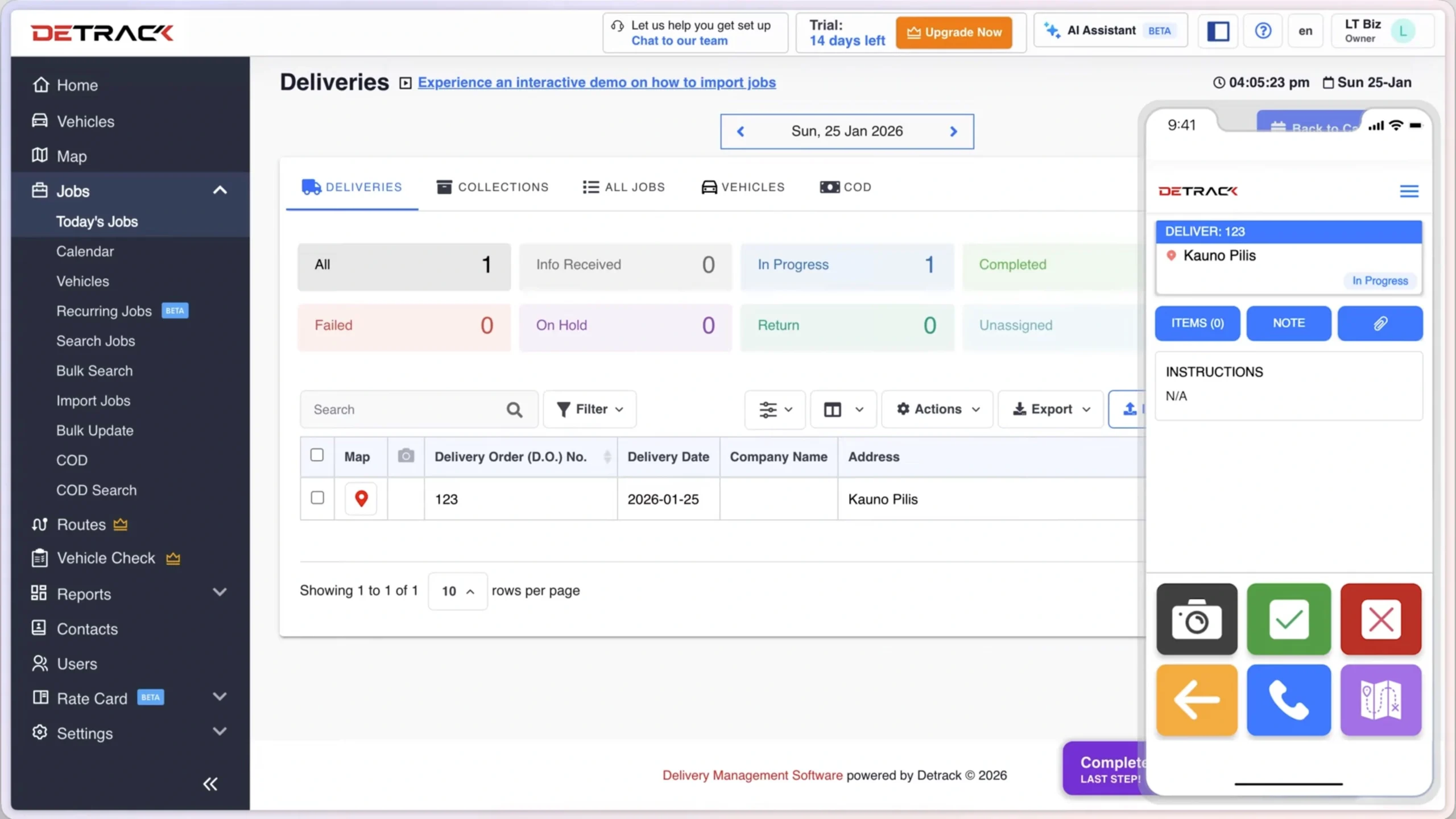
Why Detrack is the best for field service management?
- Recurring Jobs: The ability to create weekly or monthly recurring jobs saves time and automates long-term operations.
- Flexible Workflow: Proof of Delivery (POD) is not mandatory by default and is not a required step to finish a task, which suits field service needs.
- Direct Assignment: Tasks are assigned directly to drivers, making route creation an optional rather than mandatory step.
- Data Flexibility: High customization for fields allows businesses to capture specific data and forms unique to their field service requirements.
Key Features
- Zone-Based Route Planning: Offers a unique route planning logic based on specific geographic zones.
- Text-Based Task Creation: Allows for the creation of tasks using text addresses even if the system cannot pinpoint the exact location.
- Customizable PDF Reports: Generates formal, fully customizable POD reports in PDF format for easy sharing.
| Pros | Cons |
|---|---|
| Simple and intuitive product to use | Limited number of available integrations |
| Affordable starting price at $29 per month | Necessary operations like jobs, search, and maps are on separate pages |
| Fully customizable tracking widget | No customer portal available for external users |
DeTrack Pricing & Trial Info
Detrack provides a 14-day trial account with no credit card required. The onboarding experience is seamless and allows for quick testing of the platform features. DeTrack pricing packages:
- Pro: $29 / driver
- Advance: $39 / driver (Route optimization is available on this plan)
Driver App
The driver application features large buttons, which is an ideal approach for field service workers. This design caters to users who need to complete tasks with as few steps as possible and do not use their phones extensively during active service.
Design
The design is accessible and requires no formal training to understand. On the admin side, the map and order lists are separated, which can slow down real-time operations. The date filter is limited to a single day rather than a range, and the interface could utilize space more efficiently, as the current table view only displays six orders at a time.
Support
Support is handled via a real-time chat (Intercom) embedded within the product. This provides a standard and acceptable support channel for resolving issues quickly.
DeTrack Rating & Reviews
Track-POD: Best For Route Planning
Supporting multi-piece tasks is a key advantage of Track-POD. It is an excellent choice for companies handling large items consisting of multiple parts, such as unassembled appliances. The platform offers a flexible pricing structure with both stop-based and driver-based models, allowing businesses to choose the most cost-effective option.
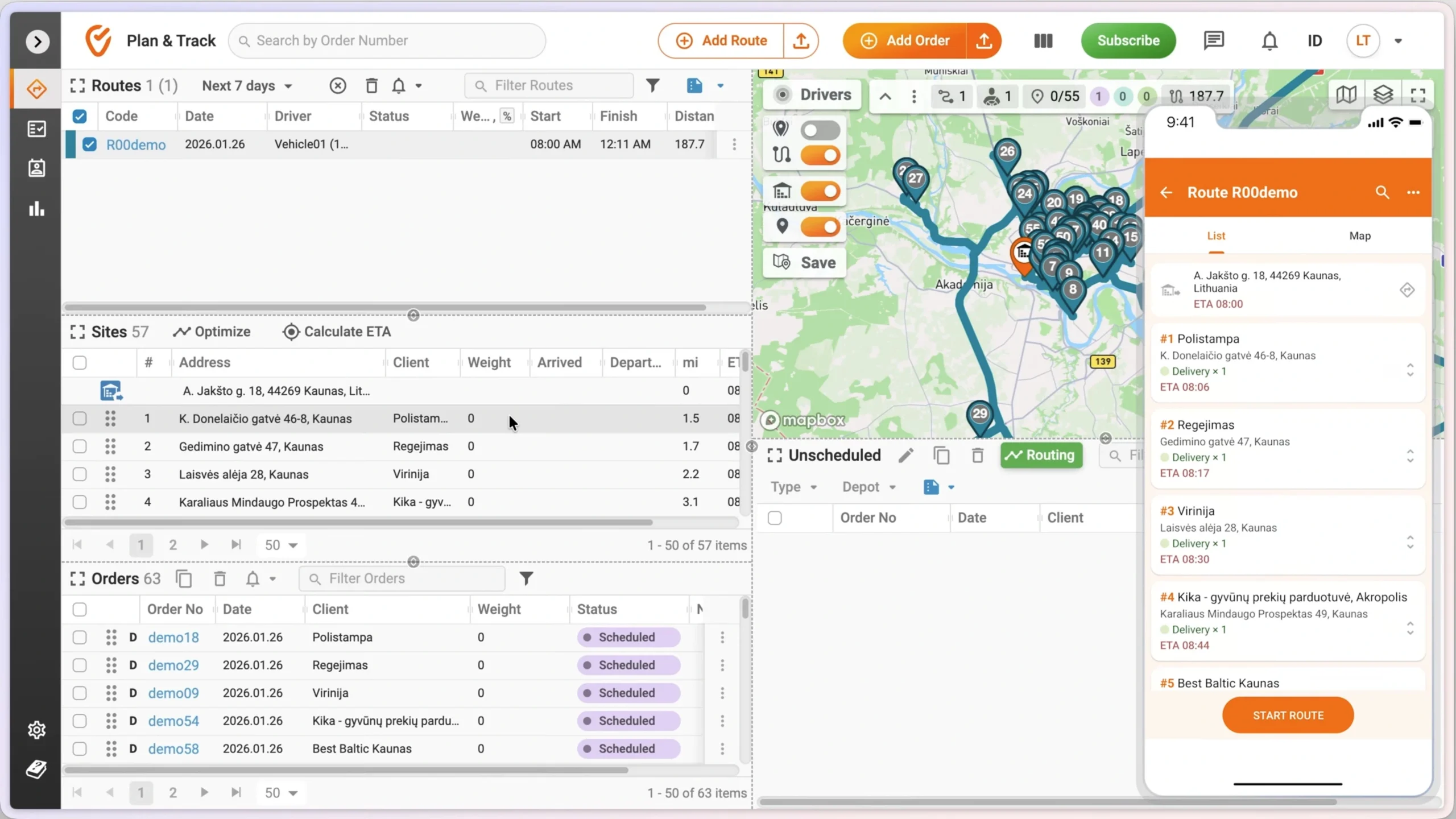
Why Track-POD is the best for route planning?
- Vehicle and Driver Management: Vehicles and drivers are managed separately. This is helpful for companies with their own fleets where drivers use different vehicles, as it prevents the creation of redundant accounts.
- Pre-Route ETAs: By considering the route start time, the system displays the ETA for each stop before the driver even begins the journey.
- Advanced Planning Settings: A wide range of restrictions and settings, including service time, auto-balance, and region-based algorithms, makes it a versatile option for various industries.
Key Features
- Offline Mode: The driver app includes a unique offline mode, which is a rare feature in the market.
- Order and Stop Separation: The system distinguishes between stops and orders, allowing one stop to contain multiple orders for better organization.
- Role and User Management: Offers granular access control for different team members, which is ideal for large logistics teams.
| Pros | Cons |
|---|---|
| Comprehensive map functions that remain lightweight in the browser | Complicated UX that requires time to learn, specifically regarding sites versus locations |
| Clear differentiation between drivers and vehicles | No white-labeling options available for customers |
| Efficient capacity management during route planning to maximize fleet usage | Task assignment is a multi-step process that is not straightforward |
| Lacks earning or wallet features for drivers and does not provide an auto-dispatching algorithm |
Track-POD Pricing & Trial Info
Track-POD offers a 7-day free trial with no credit card required to start. Track-POD pricing packages:
- S Plan: $285 / Month (1,500 orders included)
- M Plan: $510 / Month (3,000 orders included)
- L Plan: $900 / Month (6,000 orders included)
- XL Plan: $1,440 / Month (12,000 orders included)
Driver App
The app includes useful scanning and departing features, along with biometric login for drivers who are busy loading or delivering. However, the task progress can be confusing for drivers because there are many steps, and it is not always clear which stage of the process they are currently in.
Design
Drag-and-drop functionality for all features is the signature of the Track-POD design. The interface includes resizable elements—such as the map, unscheduled tasks, routes, and sites—which allow users to customize their layout based on their current activity.
Support
Support is handled through a ticket-based system rather than real-time chat with the customer service team.
Track-POD Rating & Reviews
OptimoRoute: Best For Scheduled Fixed Routes
The brand name reflects its core strength: optimizing routes. It is the premier choice for operations where orders are received one or more days in advance. It has been a recognized leader among route planning tools for years.
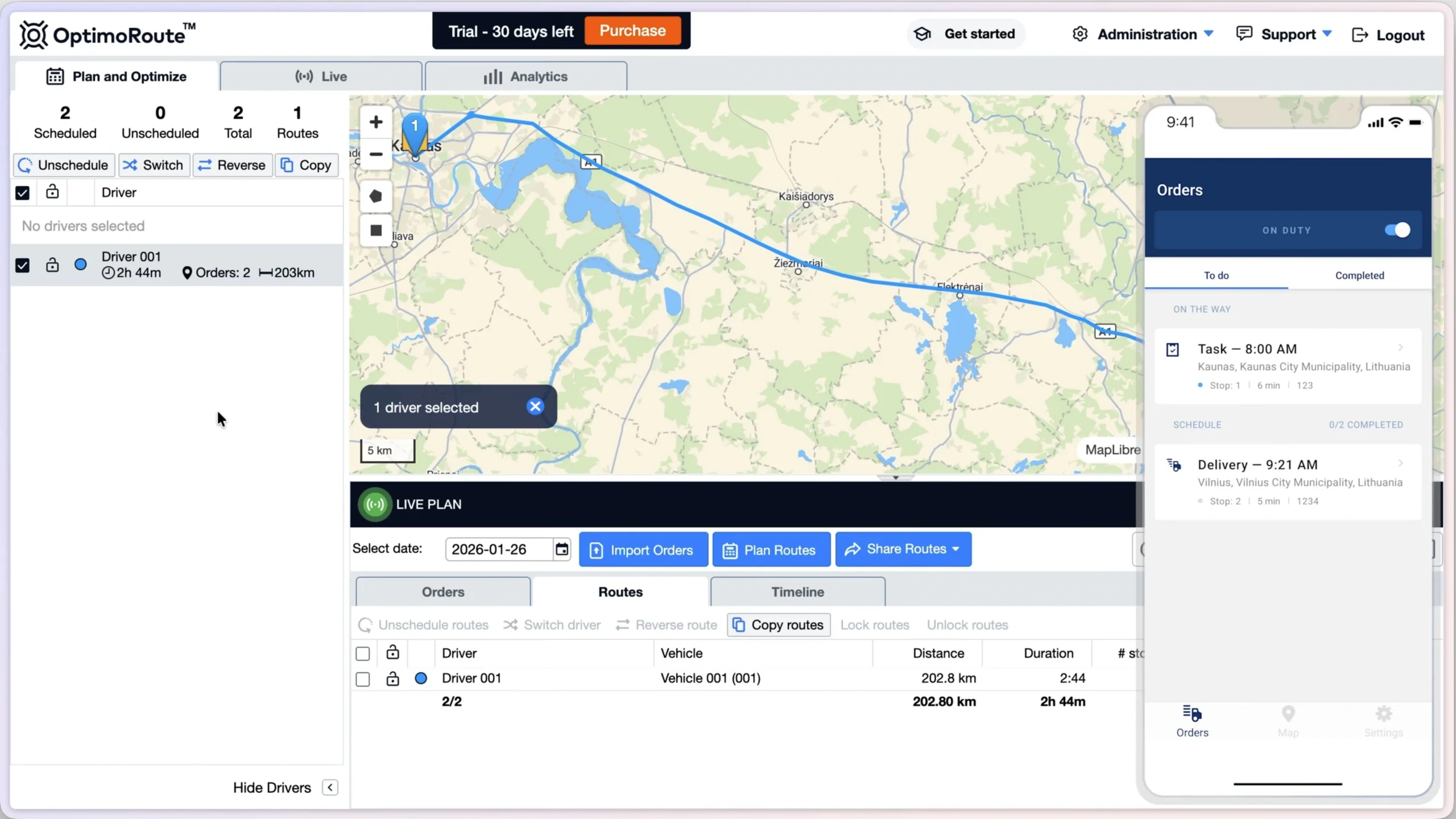
Why OptimoRoute is the best for scheduled fixed routes?
- Waterfall Design: The step-by-step workflow supports scheduled fixed routes, removing the need for constant system interaction.
- CSV Importing: The default method for importing addresses is via CSV, which is ideal for managing bulk scheduled orders.
- Break Time Management: Including break times allows fleet teams to anticipate shifts throughout the day accurately.
- Early ETAs: Providing ETAs before the route starts offers real-time visibility, allowing receivers to know their expected delivery time days in advance.
Key Features
- Flexible Pricing: Pricing is per vehicle with no limit on the number of orders; however, there is a limit on the number of tasks that can be planned at one time.
- Driver Break Windows: The system accounts for driver break times, such as lunch or rest periods, when calculating ETAs and optimizing routes.
| Pros | Cons |
|---|---|
| Capable of handling routes with a large number of stops (+1,000) | No customer portal concept |
| Supports different job types, including pickup, delivery, and general tasks | Limited number of statuses available per job |
| Longest trial period in the category | Driver profile and management features are very limited |
OptimoRoute Pricing & Trial Info
OptimoRoute provides a 30-day trial, which is the longest trial period on this list. During the trial, all important features are functional, allowing for a thorough evaluation of the software.
Pricing is per driver per month. OptimoRoute plans:
- Lite: $39 / driver
- Pro: $49 / driver (Proof of delivery is available on this plan)
Driver App
The app supports all major navigation applications and allows drivers to set a default, eliminating the need to choose an app for every stop. The interface is simple but lacks driver-side features like profile management or the ability to change passwords.
Design
The dashboard is designed for waterfall operations that follow a specific sequence. Users must plan and assign in one tab, track and monitor in another, and analyze results in a final tab once the work is completed.
Support
Support is provided through a ticket-based system. A knowledge base featuring helpful articles is also available directly within the product.
OptimoRoute Rating & Reviews
What to Look for in Delivery Management Software
All delivery management systems must have mandatory features and extended (add-on) features.
Key features (must-haves):
- Driver management
- Real-time tracking
- Notifications
- Proof of delivery
I won’t explain these as they are must-have features; if a company doesn’t have these, you won’t see it on my list.
Extended (add-on) features
There are some features that are important and make a solution fit for a specific use-case or industry.
Custom Fields
The ability to define different fields to include business data in the task/job. Delivery management systems are used in different industries, and some have their own standards, data requirements, and ranges of information needed to complete a delivery. Common custom field types:
- Number
- Single/multi-line text
- Files (image or PDF)
- Phone number
- JSON
Route Planning
Planning routes based on factors like vehicle capacity, driver shifts, and delivery time windows is also important for high-volume delivery operations.
Multiple POD
Getting one signature or one photo is a default requirement, but in some use cases, a driver needs to upload multiple POD photos or barcodes. For example, for furniture delivery, a driver needs to take multiple photos from different angles to ensure there is no damage during the delivery process.
Customer Portal
Having a portal or application for customers to book a delivery, pay costs, track in real-time, and access labels is mandatory for some companies (especially couriers) looking for a system to manage their deliveries.
Accounting / Invoicing
For the customers your company delivers for, you need price calculations for each delivery and the ability to receive payments. Additionally, generating invoices for B2B clients helps companies avoid paying for separate accounting/invoicing software.
Cash on Delivery Management
When a driver delivers, they sometimes need to collect cash from the receiver. Having a complete cash-on-delivery management process is important to prevent chaos.
FAQ: Best Delivery Management Software
It depends on what your company does, who it serves, and what the delivery workflow is. Each tool has its own strengths and weaknesses. The best option can’t be chosen if you don’t have data.
In the list above, Shipday provides a free version with a limited number of orders. As your delivery management software choice affects your operational costs, choosing the best option shouldn’t always be based on price.
It’s software that handles delivery operations for e-commerce businesses. Integration with e-commerce platforms and tools is a key feature you should look for.
It starts with task or order creation, then assignment to drivers, and finally completion of the delivery. Making this process visible, having notifications for all parties, and using automation for efficiency are key values.
Onro has been built based on courier requirements over five years. Its purpose is to be the operating system for courier companies and cover all processes. That’s why it’s not a general DMS, but a specifically designed technology.
Making assignments automated and optimizing routes cuts fuel costs and driving time significantly. Customers also gain full visibility of the process.
Not all companies need a delivery management system for their own deliveries. Sometimes a delivery order comes from a customer that the delivery company needs to fulfill. In this case, the customer portal makes the process easy and accessible for both the customers and the company.
By API integration, WMS or other order management systems can be connected to push deliveries and receive updates from the system.