What’s New in March 2026?
March’s releases focus on one goal: smoother execution with fewer interruptions across Driver, Dispatcher, Web, Communication, and Scanner workflows. Drivers can move faster on long P&D routes with stop search and stricter scan-based loading control. Ops teams get clearer visibility in the Web App with joined order tables, safer delivery communication through call masking, and more controlled warehouse processing with bulk scan actions. On the admin and dispatcher side, messaging becomes more flexible with multi-provider sending and tighter targeting filters, while the order creation form and order editing tools reduce rework and make day-to-day updates quicker.
Search stops on P&D routes
Finding the right stop on a busy P&D route can take time, especially when drivers need to scroll through a long list of stops. This update makes stop handling faster and helps drivers follow the correct route flow.
It also adds more control to the loading process when scanning is required. This reduces skipped steps and supports teams that rely on scan-based parcel checks.
- Drivers can now search stops within a P&D route
- Routes start automatically when the driver performs and action on a stop
- Manual completion is not available when mandatory load scanning is enabled
- This helps reduce missed steps during route execution
- It is especially useful for long P&D routes with many stops
- It also supports teams that need tighter scan-based load control
Joined order tables in the Web App
Reviewing order records is easier when related information appears in one place. Before this update, teams often had to move between separate tabs or different table structures to compare order data.
The Web App now joins order tables for on-demand and P&D order types. This creates a clearer view and helps users review order information faster during daily operations.
- Order tables for different order types are now joined in the Web App
- Users can review connected order data with less manual comparison
- This reduces back-and-forth between separate tabs and table views
- It supports faster order checks during day-to-day work
- It improves visibility when reviewing order records across order types
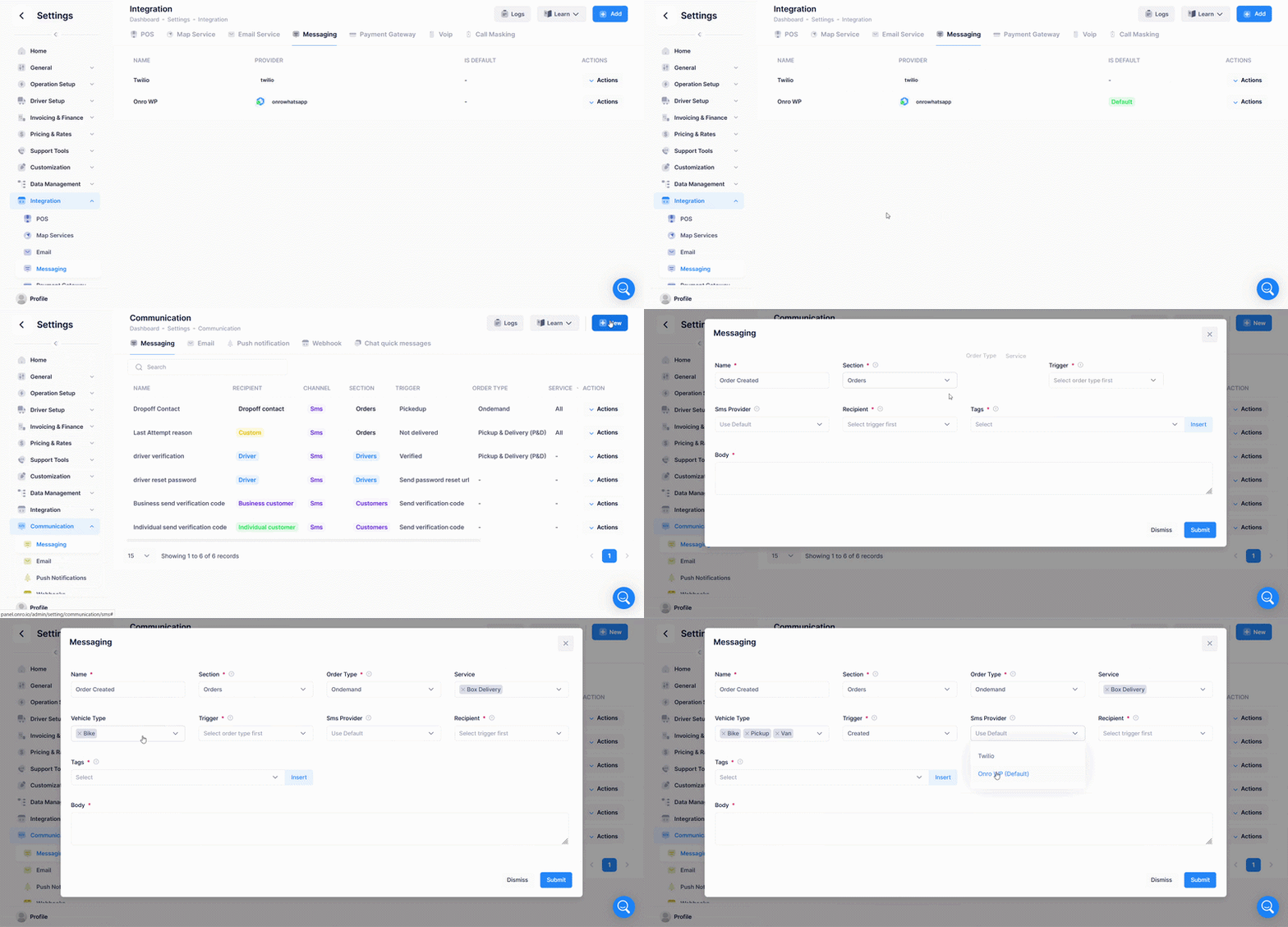
Multi-Provider (Sender) for Email, SMS, and WhatsApp
You can now connect multiple messaging providers and choose which one to use when sending messages from the Communication module. This allows teams to route messages through the right provider while keeping daily workflows unchanged.
Key capabilities
- Connect multiple providers in the Communication settings
- Add multiple Email senders, SMS providers, and WhatsApp providers
- Set a default provider for general Communication messages
- Choose the sending provider directly inside the Communication module
- Use different providers for different triggers and messages
This makes it easier to separate communication channels by use-case and subject, receivers, or operational needs.
New Communication Filters: Service and Vehicle Type
The Communication module now includes additional filters to help teams target the correct orders before sending outbound messages.
New filters
- Filter Communication Message by Service
- Filter Communication Message by Vehicle Type (not available for P&D order type)
This improves accuracy and more controls on messages.
Improved Order Creation Flow
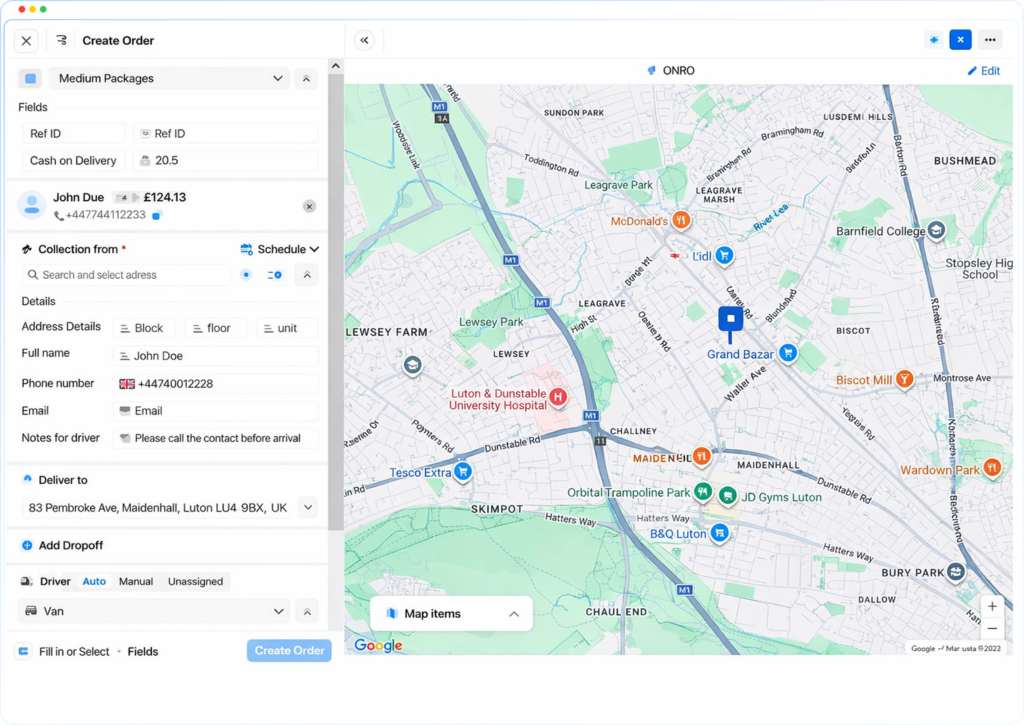
The order creation form has been reorganized to reduce scrolling and make the input flow more intuitive.
Changes
- Vehicle selection now appears after Pickup and Delivery addresses (matching the mobile app flow)
- Override ETA now appears as the final step before Place Order
- Address details can be added before selecting the address (useful when instructions are provided first)
- Yes/No service options use better space
These improvements help dispatchers enter order information faster and with fewer adjustments.
Call Masking for Secure Delivery Communication
Call masking is now available to protect phone numbers during delivery-related calls. Phone numbers remain hidden while calls are securely routed through a safe connection.
Protected contacts
- Driver
- Customer
- Pickup contact
- Drop-off contact
- Other delivery participants
Call masking is integrated with Twilio service.
Check & Update Operations in the Scanner App
The Scanner app has been updated to support faster warehouse workflows and more controlled bulk actions.
Teams can now filter orders before scanning, select what happens after each scan, and track progress from a checklist-style list.
Filter orders before scanning
- Status
- Route
- Created date
- Zone
- Last attempt reason
- Attempt number
Actions after scanning
- Update status (supports all statuses, similar to advanced assign)
- View quick order information & check the list
Each successful scan marks the order as completed. Unmatched scans display a Not found message.
This expands scanner usage across common warehouse operations, such as:
- Route assignment
- Return processing
- At Warehouse updates
- Rule-based status updates
Expanded Order Editing
More order fields can now be edited after an order is created.
Editable fields
- Reference ID (from Edit Order Info)
- Custom Fields
- Order Notes
Single Order Status Updates for P&D Orders
Pickup and Delivery (P&D) orders now support direct status updates for individual orders.
- Update the status of a single P&D order directly from the order’s status or actions controls
This simplifies editing without requiring bulk tools.
✨ Improvements
- The top navigation bar has been removed from the Admin Center Settings tabs for a cleaner layout and easier navigation between settings sections.
🐞 Bugs Fixed
- Resolved the Stripe checkout pop-up blocking issue in Safari.
- Fixed phone number parsing in Create Order so pasting no longer drops digits (including formats with a leading 0 instead of the country code).
- Resolved a UI issue affecting the POS tab in the Admin Center.
- Fixed an issue that caused the Driver App to force-close with an error.
- Resolved an issue where order address and other order details updates were not applied correctly.