What’s New in May 2026?
This month’s release introduces the new Route Manifest PDF, allowing teams to export complete route and stop information for easier printing, driver handoff, warehouse preparation, and record keeping.
We’ve also improved invoice partial payment tracking, added start location navigation in the Driver App, and streamlined the Orders table and date filters across the Dispatcher and Web App for a cleaner, more efficient workflow.
Together, these updates improve visibility and simplify daily operations. It also helps teams work more efficiently across dispatching, multi-dropoff orders, routing, and invoicing.
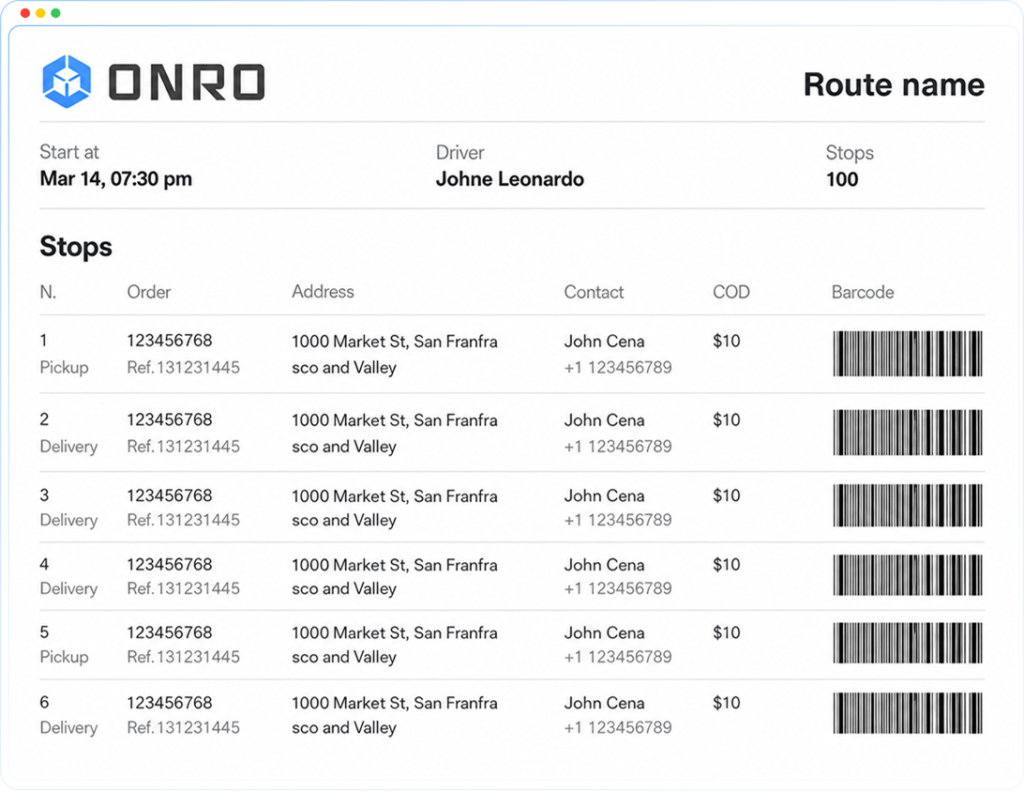
P&D Route Manifest
For Pickup & Delivery routes, the manifest generates a table-based summary of every stop assigned to the route. It includes route-level details at the top, including route name, driver, total number of stops, and start time, followed by a full stop table with the stop number, stop type, order number, reference ID, address, contact, COD amount, and barcode for each stop.
- Generate a Route Manifest PDF for any P&D route
- View all route stops in a structured table layout
- See route-level details: route name, driver, total stops, and start location
- Review stop-level details: stop number, stop type, order number, reference ID, address, contact, COD, and barcode
- Use for printed route handoff, dispatcher review, warehouse loading preparation, or internal documentation
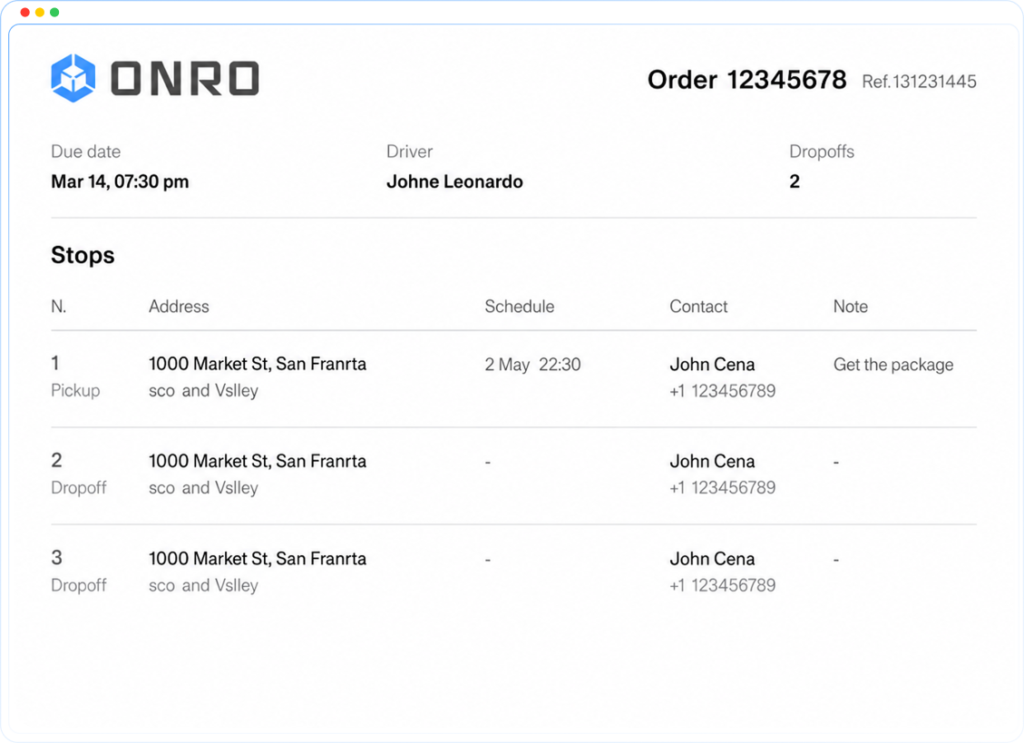
On-Demand Multi-Drop Manifest
For on-demand multi-drop orders, the manifest generates a stop-by-stop summary of all drop points in the order. It includes order details information similar to the P&D Route manifest and a table with the dropoff numbers, pickup and dropoffs addresses, scheduled time, contact, and notes for each pickup and dropoff.
- Generate a manifest PDF for any on-demand multi-drop order
- View all stops in a structured table layout
- See order-level details: order number, reference ID, driver, due date, and total dropoffs
- Use for pre-dispatch review, driver handoff, or internal order documentation
Better Partial Payment Tracking for Invoices
Partially paid invoices now provide a clearer payment workflow and better history tracking. When an invoice is marked as partially paid, the system shows how much has already been paid, how much remains unpaid, and a turnover history of the partial payment updates.
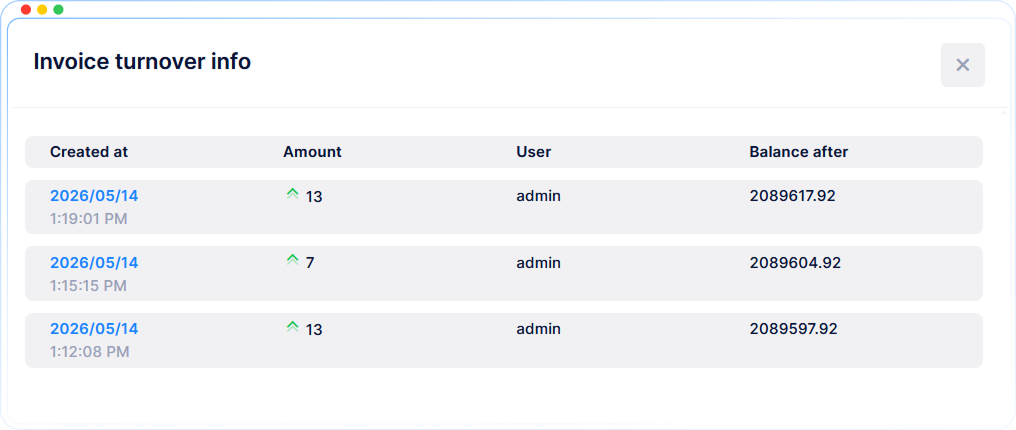
In addition, each partial payment creates a creditor (positive) transaction in the customer’s wallet for that paid amount. If the partial payment action is repeated, a new creditor transaction is created again for the new step as well. This gives finance teams a clearer link between invoice progress and wallet activity.
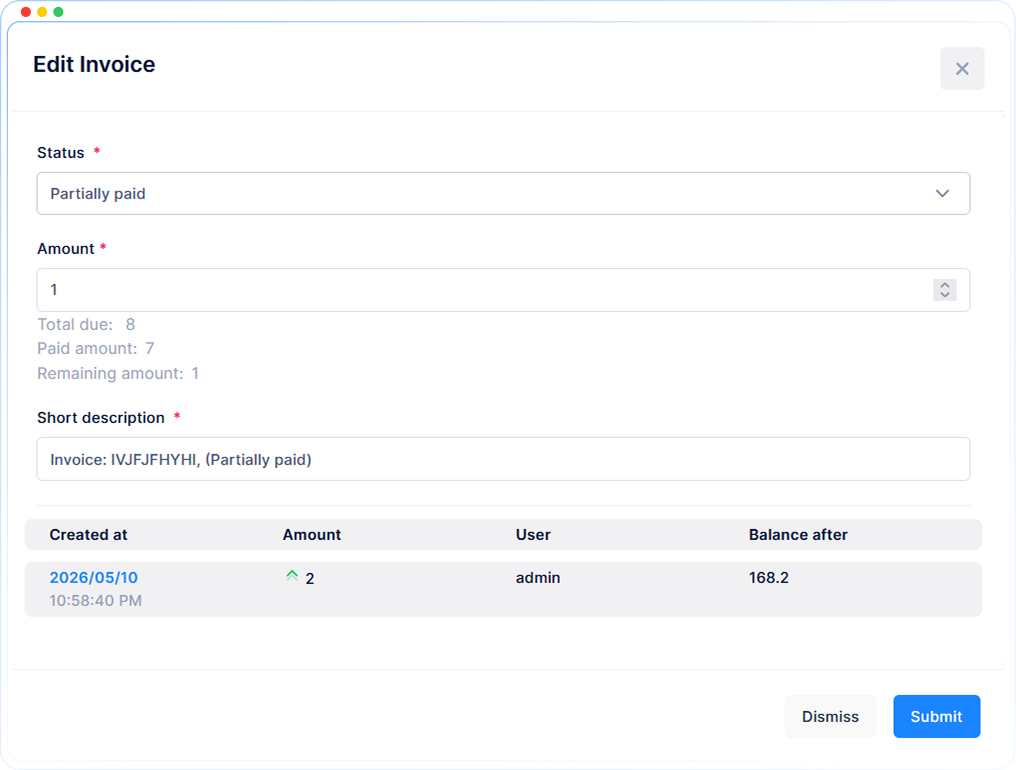
- See the total due amount
- See the paid amount
- See the remaining amount
- View the invoice turnover history
- See the created date and time for each payment update
- See the amount added in each step
- See which user updated the invoice
- See the balance after each payment step
- Create a creditor wallet transaction for each partial payment amount
- Repeat the wallet transaction when the partial payment action is repeated
This makes partial payment handling easier to follow and gives teams better visibility into both invoice history and related customer wallet transactions.
Start Location Navigation in Routes
The Driver App now makes it easier for drivers to begin a pickup by giving them direct navigation from the start location to the first stop location in a route. This helps drivers move into the route flow faster and reduces extra steps when starting a job.
The update improves the first stage of the pickup workflow by making navigation more direct and practical during live operations.
- Navigate from the start location directly to the pickup order
- Reduce extra manual steps before beginning the pickup flow
- Help drivers start route execution faster if they’re not at the start location
- Improve clarity during the first part of a pickup job
- Support smoother navigation in day-to-day driver operations
Cleaner Orders Table in Dispatcher and Web App
The Orders table has been updated to make key order details easier to review. Several fields that were previously split across multiple columns are now grouped into simpler formats, helping teams scan the table faster and work more comfortably.
Simpler Pickup and Delivery Time Columns
Pickup and delivery timing is now shown in two clearer columns:
- Pickup Window
- Delivery Window
Each window displays time in a simpler format based on the values available:
- Start and end time: 09:00 → 12:00
- Only end time: Until 12:00
- Only start time: From 09:00
- None: —
This makes it easier to understand timing at a glance without checking several separate fields.
Fewer POD and POP Columns
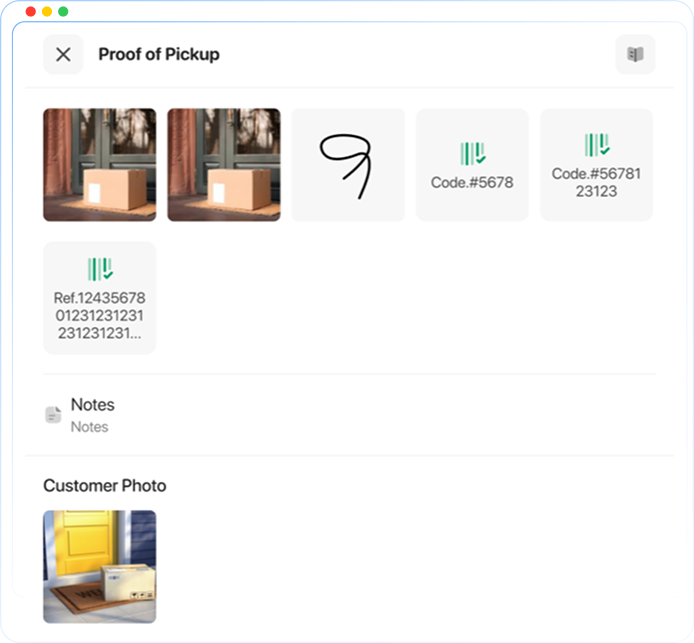
Proof-related details are now grouped into fewer columns to make the table less crowded.
Instead of several separate proof columns, the table now shows:
- Pickup POP
- Delivery POD
Each proof column can include:
- Note
- Photo
- Signature
This makes proof details easier to review without scrolling across too many columns.
One Search Field for Order Code and Reference ID
Search is now simpler in the Orders table. Instead of choosing between search types, users can now search with a single field.
- Search by Order Code
- Search by Reference ID
- No need to select a search type first
This makes it faster to find the right order when users already have a code or reference.
Simpler Notes and Payment Details
Notes and payment information are now grouped more clearly in the Orders table, making them easier to review and filter during daily work.
One Combined Notes Column
Notes are now easier to check in one place.
- On-demand pickup and drop-off notes now appear together in the same column
- P&D notes continue to appear as regular text
- One notes filter now searches across all note types together
This helps teams review note-related information without checking multiple fields.
One Combined Payment Column
Payment details are also now shown in a simpler format.
- Payment method and payment side are combined into one payment field
- Final payment values appear as:
- Cash Sender
- Cash Receiver
- Wallet
- Card
This makes payment setup easier to understand and filter.
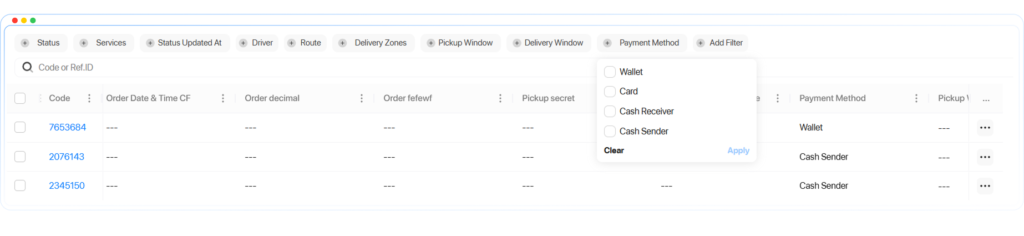
Updated Date Filter in the Web App
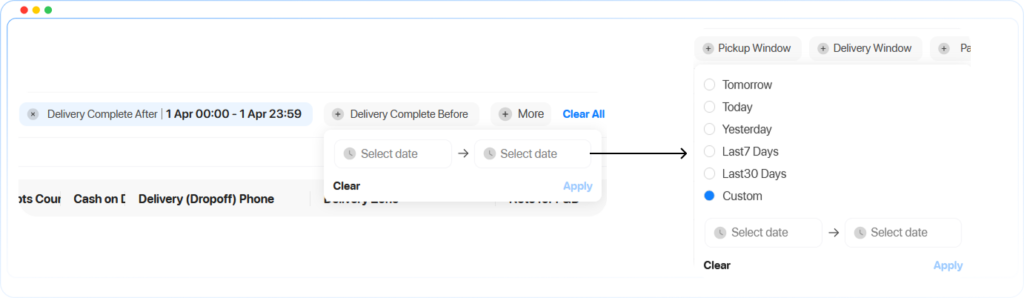
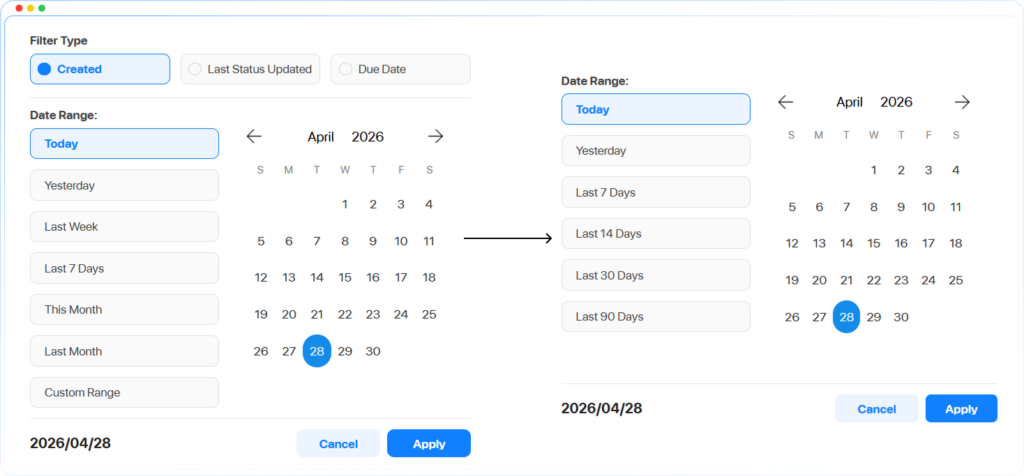
The Web App date filter has also been updated to make filtering faster and more focused. The new layout gives quicker access to common date ranges and removes extra options from the date filter pop-up.
New Date Ranges
The updated date filter now includes these standard date ranges:
- Today
- Yesterday
- Last 7 Days
- Last 14 Days
- Last 30 Days
- Last 90 Days
The default date range is now:
- Last 30 Days
This makes it faster to filter orders without selecting dates manually each time.
Cleaner Date Filter Layout
The date filter pop-up is now more focused.
- Due Date has been removed from the date filter pop-up
- Last Status Updated has been removed from this screen
- Status Updated now appears next to the other table filters
This keeps the date filter cleaner and makes table filtering easier to manage.
For a full breakdown of each change, read the detailed article linked here.
✨ Improvements
- Improved UI Responsive: Status labels (Created / Draft / Cancelled) on the web portal dashboard are now readable and correctly displayed when accessing from a mobile browser
- Improved Default Phone Driver Search: The phone number field is now the default first field when searching for drivers in route stops
- Improved Driver Account Login: Admins can now force a server-side logout for drivers who have access but are unable to log in due to an existing active session on another device
🐞 Bug Fixes
- Fixed Order Button: The order button was dropping below the page margin and becoming inaccessible
- Fixed Order Coefficient: The order coefficient was not being applied correctly when creating orders
- Fixed Tracking Page: In delivery-only orders, ETA was not displayed, and the order status was not updating in real time on the tracking page
- Fixed Dispatcher Address Book: When selecting a client from the address book, only the address was populated. The contact name and phone number were left empty
- Fixed Wrong Date Language: Date fields were not respecting the selected language and were displaying in Arabic regardless of language settings
- Fixed POD Quality: Proof of delivery images were being compressed and stored in an unreadable quality
- Fixed Status Filter: The Picked Up status was missing from the status filter list for both on-demand and P&D order types