Onro’s August 2026 release adds native WhatsApp messaging so order updates can reach customers where they already are, and rebuilds the delivery tracking page from the ground up, putting pickup, dropoff, proof of delivery, and driver details on one screen so customers get answers before they have to ask.

Key Takeaways

What’s New in the August 17th, 2026 Release?
A few smaller changes this time, all pointed at the same thing: tighter control over what your team can see and touch.
Help resources now follow Intercom access
What happens when someone on your team clicks Help Center and there’s nothing behind the door? Until now, the Learn More and Help Center links in Admin showed up for everyone, whether or not their Intercom access actually allowed them to use those tools. Now the links follow that access directly: if it’s set to none, they disappear along with the dead end they used to point to.
A new permission for editing the price after an order is done
An order marked Done should mean done, earnings included. Until now, any dispatcher could still adjust price and earnings on an order no matter its status. Dispatcher permissions now include Edit Price After Done, so you decide who keeps that ability once an order closes. Leave it off for a dispatcher, and the numbers lock the moment the order does.
A cleaner list of SMS providers
A provider listed under WhatsApp should actually deliver over WhatsApp. Two that didn’t have been removed from the list, so setting up your messaging providers now means choosing from options that work, not ones that only looked like they did.
This release also cleared out 22 smaller bugs, order search, address editing, and mobile login among them, and added a couple of conveniences: the option to turn off automatic receipts, and a more useful set of columns in the orders table. None of it changes what Onro looks like. It changes who’s allowed to do what inside it, which for a growing team is usually the fix that matters more.
What’s New in the August 16th, 2026 Release?
Order updates that reach customers on WhatsApp
A tracking link only helps once someone opens it. What if the update just showed up in the app your customers already have open all day? Onro now connects directly to the WhatsApp Business Platform through Meta’s Cloud API, so order confirmations, tracking links, driver details, and delivery status can go out as automated WhatsApp messages instead of relying on SMS or email alone.
- Sent from your own number: messages go out through your own WhatsApp Business number, not a shared or generic sender, so customers know exactly who’s messaging them.
- Approved templates, real order data: every automated message uses a template Meta has approved, with your live order data mapped in: order code, ETA, driver name, whatever the template calls for.
- Priced for operations, not marketing: routine updates like tracking links and delivery confirmations run as Utility templates, which cost less than Marketing ones.
Setting it up means connecting a WhatsApp Business Account in Meta’s dashboard, creating your templates, and adding WhatsApp as a provider in Onro’s Communication settings. The full walkthrough is in the help center guide.
Customers get the same answers a tracking link gives them, just delivered somewhere they’re already checking.
What’s New in the August 8th, 2026 Release?
Picture one of your customers a few minutes after their order goes out. They open the tracking link, see a dot moving on a map, and an ETA that may or may not still be accurate. Is the driver close? Did the pickup even happen? Who’s driving? The link answers none of it, so they do what anyone would do: message you and ask.
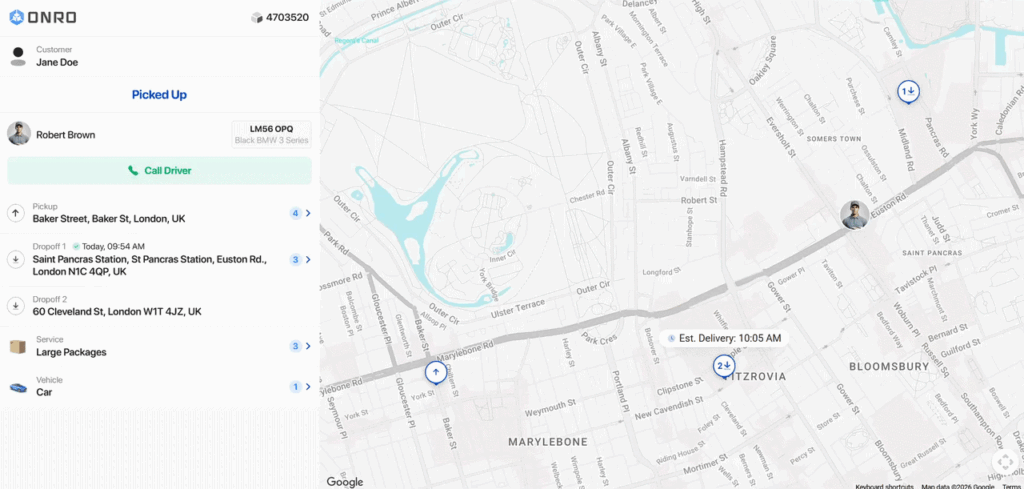
That’s the gap this release closes. We’ve rebuilt the track page from the ground up, so the answers are already on the screen before the question gets asked.
A track page that explains itself
The old track page told customers where the order was. The new one tells them what’s happening to it. Pickup, dropoff, service, and vehicle information now sit together on one main screen, so a customer isn’t hunting for context that used to live somewhere else, or nowhere at all. The whole thing also just looks better: cleaner layout, clearer hierarchy, easier to read on a phone held in one hand while carrying groceries in the other.
Proof, not just a promise
Proof of delivery has always mattered more to the customer than to the courier company. If proof of pickup or proof of delivery has been uploaded, it now shows up right on the track page as soon as it’s captured, so nobody has to ask for it separately.
Knowing who’s coming, and when
Two changes here work together. The driver’s profile picture now appears on the track page, so the person at the door isn’t a stranger; the customer already knows who to expect. And ETA updates are more accurate and easier to follow in real time, so “on the way” actually means something instead of being a placeholder that resets itself.
One tap for the full story
Curiosity doesn’t stop at the summary screen. Selecting pickup, dropoff, service, or vehicle now opens a dedicated page with the full detail behind it, proof of delivery included. Customers who want more can get it in one tap. Customers who don’t can just glance at the main screen and move on. Either way, they’re not messaging you to find out.
Fewer “where’s my order” messages means less back-and-forth for your dispatch team and support inbox, and a customer who trusts the delivery because they can actually see it happening.
Here’s what it looks like now: