Onro’s September 2026 release adds one-tap WhatsApp contact for pickup and dropoff contacts, gives admins their own custom shortcuts inside the driver app’s menu, and stops drivers from going offline in the middle of a route by accident.

Key Takeaways

What’s New in September 2026?
This update adds two features that give you more control over customer communications and more flexibility in the Customer Web Portal.
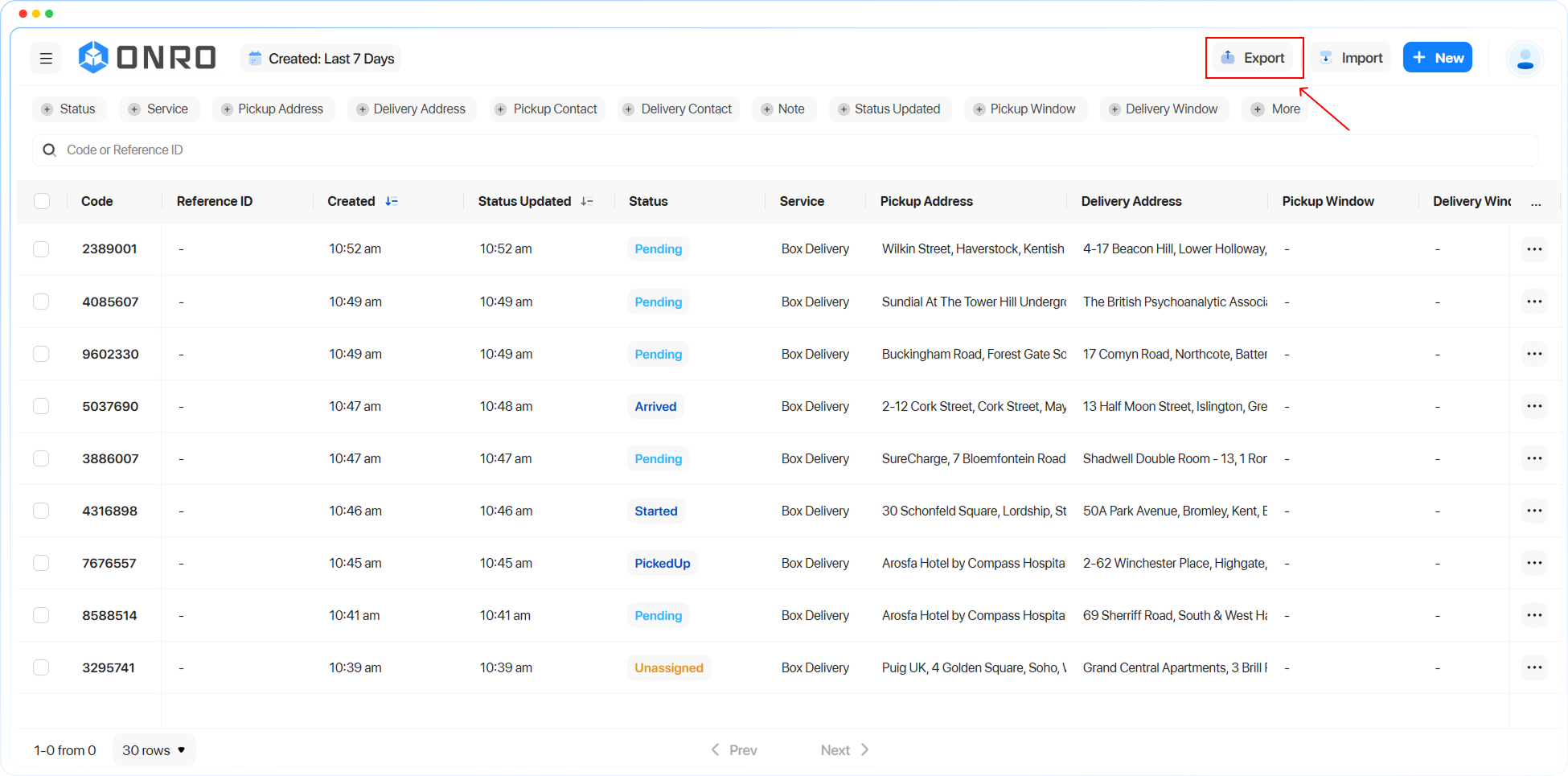
Order Export in Customer Web Portal
Your customers can now export the order table directly from the Customer Web Portal. They can filter the table columns to show the data they need, then export it with the Export button on the order table page.
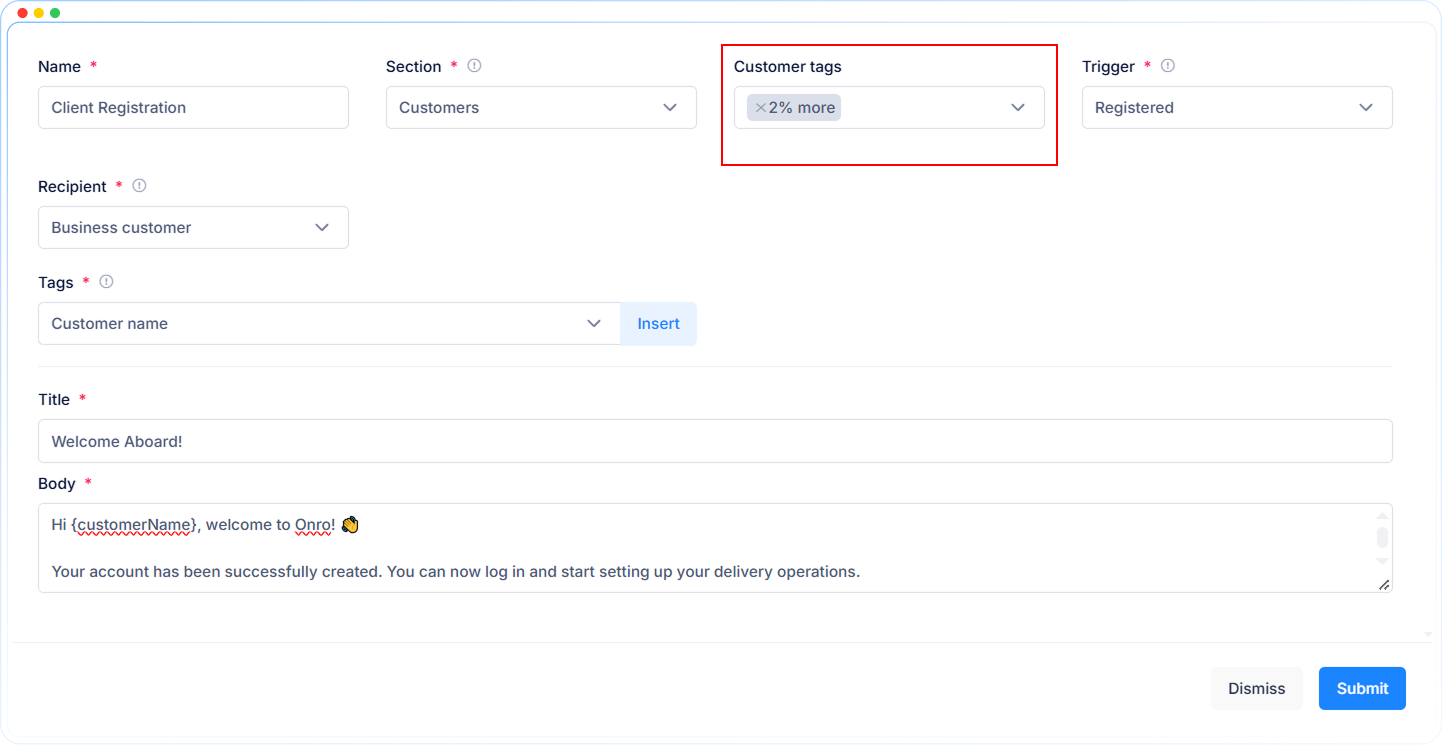
Customer Tag in Communications
You can now set communication templates to target specific customer tags. A template is sent only to customers with the selected tag, which gives you more precise control over who receives each message, email, or notification.
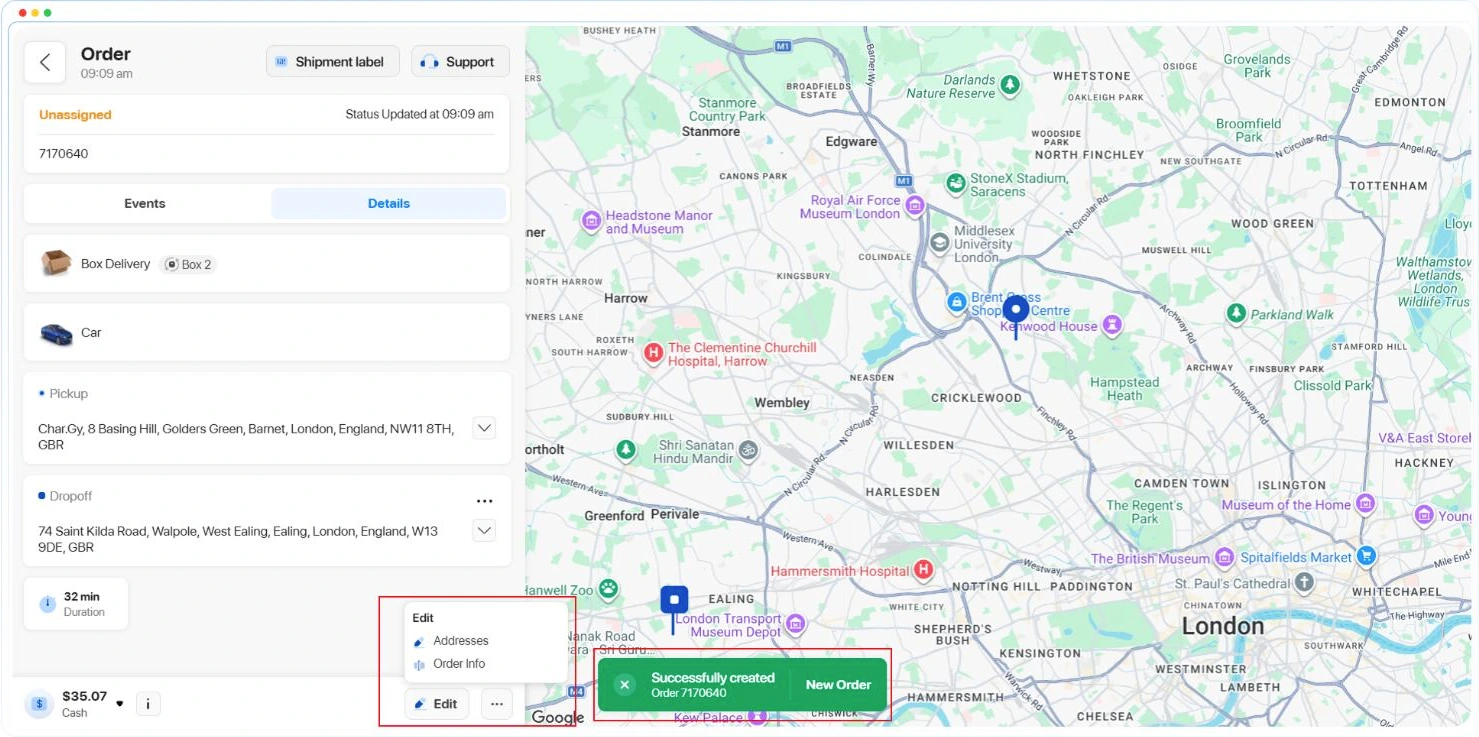
Create Orders Back-to-Back
Creating several orders in a row is now easier. After the customer creates an order, a toast notification appears and they go straight to the order details. To create another one, the customer can click New Order on the toast and a fresh form opens, ready for the next order. This cuts the delay between orders while keeping the details of the one just created in front of them.
Edit Access Restored
The Edit button is back as a separate button, with its own dropdown apart from the More menu. To keep the layout clean, the price and payment method sections now use the same compact style as the order creation form.
Easier Access to Order Details from the Table
Table rows now have a hover effect that makes it clearer how to open order details. Order codes appear in a darker text color, and when you hover over a row, the code is highlighted so it stands out (colored, bold and underlined). The whole row is also clickable, which gives you more than one way to open an order.
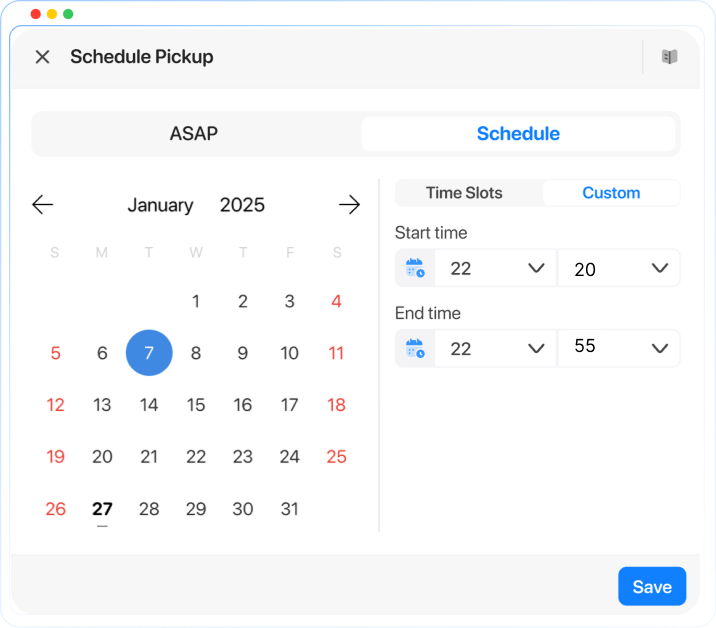
Custom Schedule Range Settings
Scheduling time ranges are no longer fixed. Customers and dispatchers can now select their own time range instead of a static window, so scheduling fits your operation.
Done Routes Hide/Show Settings
You can now choose whether completed routes stay visible in the Driver app. This option is in the Working Type settings in the admin panel, so drivers see only the routes still relevant to them.
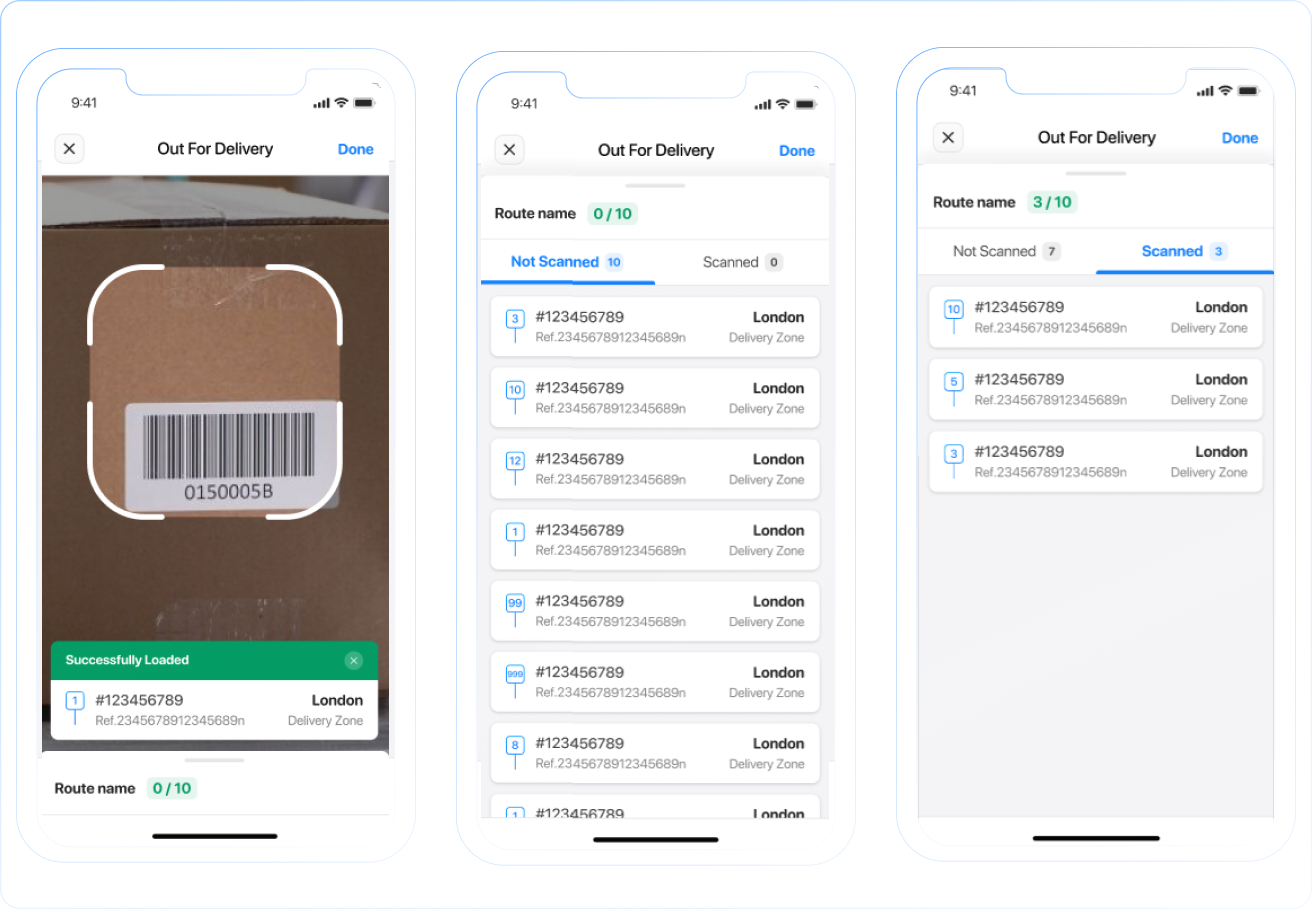
Bulk Load Orders List
Bulk loading in the Driver app now shows two separate lists: orders still waiting to be scanned, and orders already scanned. This makes it faster to find the remaining parcels and confirm everything is loaded before starting the route.
Reaching customers the way they actually respond
Picture a driver standing outside a customer’s building, phone in hand, dialing a number that just rings and rings. The customer is three floors up, headphones in, not expecting a call. A text might reach them. A WhatsApp message almost certainly would. On the other hand, the contact’s phone number might be from abroad and cost the driver a fortune to call them directly, and they need to call the customer on WhatsApp to make sure he reaches them and doesn’t pay so much for a call. But until now, the driver’s only option inside the app was a phone call, so that’s what they tried, and that’s where the delivery stalled.
This release closes that gap, and two others like it. Drivers can now reach customers on WhatsApp with a single tap, admins can build their own shortcuts into the driver app’s menu, and a new safeguard keeps a driver from going offline in the middle of a route by accident. None of these are flashy on their own. Together, they take a little friction out of the parts of the job that happen dozens of times a day.
Why did the phone call fail in the story above? A phone call assumes the customer is free to talk right now, on a channel they may not even keep open. WhatsApp doesn’t ask for that. It sits in a thread the customer already checks throughout the day.
Drivers can now message pickup and dropoff contacts or the customer on WhatsApp directly from the order details screen, without leaving the app or hunting down a saved number. Admins decide whether the option is available at all, so it fits into however your business already handles contact windows and messaging policy.
Making the app feel like it belongs to your business
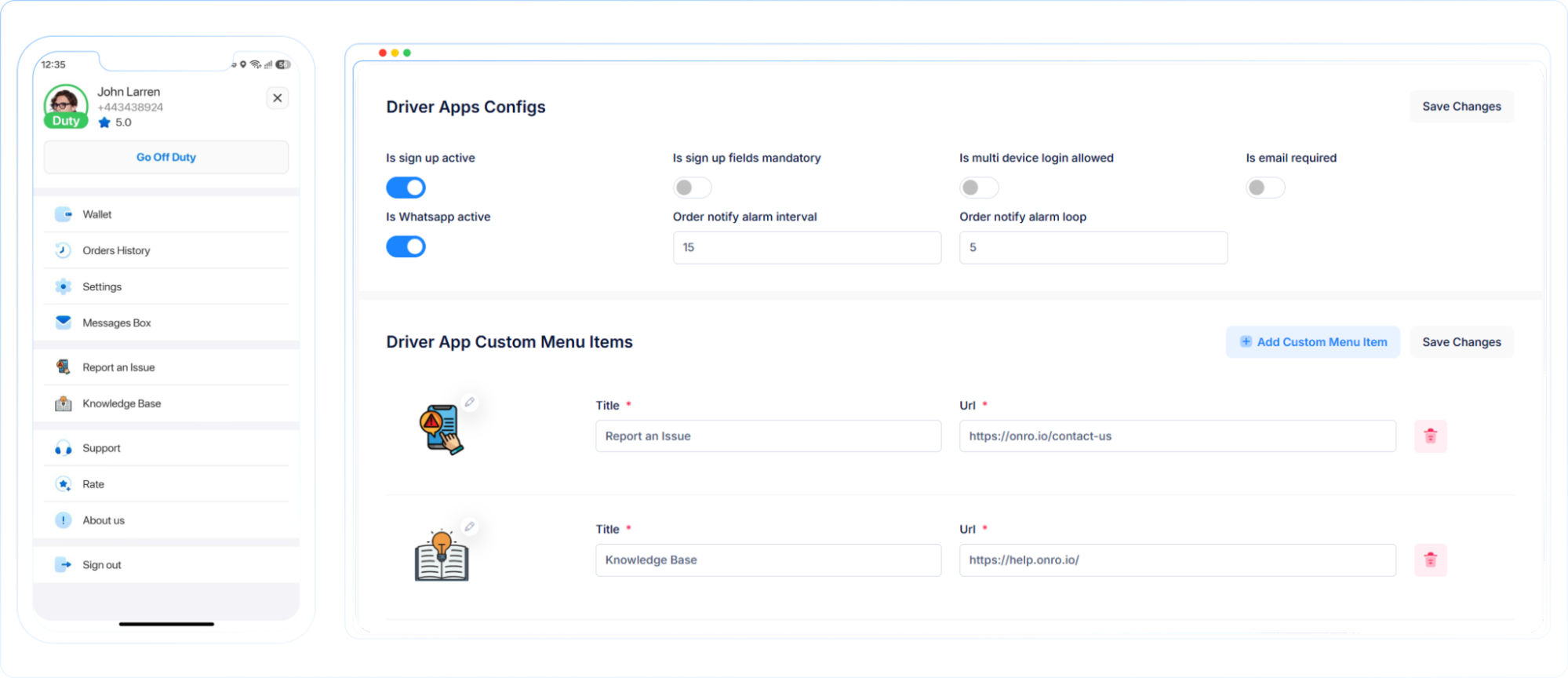
Ask an admin what they wish drivers saw first when they open the app, and “nothing beyond what shipped out of the box” is rarely the answer. Every business has resources drivers need that the app has never had a way to surface: a safety checklist, a support line, an internal wiki.
Admins can now configure their own menu items (icon, title, and link) from the admin panel and have them appear right inside the driver app’s menu alongside everything else. Point drivers to whatever resource matters most to your operation, without waiting on a feature request to get built.
Catching the moment nobody means to cause
Going offline mid-route is rarely intentional. A driver taps the wrong toggle, or a phone locks and unlocks at the wrong moment, and a route that should still be moving suddenly looks abandoned to everyone tracking it.
The app now checks route status before it lets a driver switch to offline. If a route has started, or the driver has an active route open, offline status simply isn’t available until that route wraps up.
None of this asks your drivers or your admins to do more. It asks the app to do a little more of the thinking on its own: reach the customer on the channel that actually works, put the right resource in front of the driver, catch the toggle that shouldn’t have been tapped. Small fixes, but the kind that add up across a full day of routes.
✨ Improvements
- Improved the customer web app order creation form UI.
- Added order driver information to webhooks.
🐞 Bug Fixes
- Fixed an issue where the attempt count was not showing.
- Resolved a UI issue affecting the import screen.
- The availability window unit is now displaying correctly.
- The support page no longer appears empty.
- Fixed an issue where the delivery window was not shown.
- Resolved an error that a mandatory custom field was not mandatory.
- Fixed an error on the route plan page.
- Orders that had not yet been picked up were incorrectly shown as picked up in the web app, with an inaccurate ETA; this has been corrected.
- Fixed the UI issue in the manual dispatch form.
- Resolved the iOS issue where the driver’s city and license number weren’t saved correctly.
- The issue of the customer email being saved as the driver’s email has been resolved.